
70-695 · Question #77
Your company plans to migrate all client computers to Windows 8.1 Enterprise. You test the company's line-of-business applications on Windows 8.1 Enterprise and discover the information listed in…
The correct answer is D. Deploy App2 and App3 to a virtual machine. Deploy App1 as a Microsoft Application Virtualization. To deploy applications for Windows 8.1 Enterprise clients that must run offline, RemoteApp is unsuitable due to its network dependency, leaving local virtualization or application virtualization as viable options.
Question
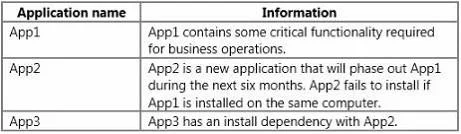
Your company plans to migrate all client computers to Windows 8.1 Enterprise. You test the company's line-of-business applications on Windows 8.1 Enterprise and discover the information listed in the following table. All of the applications must run successfully at all times, regardless of network connectivity. You need to recommend a solution for deploying the applications? What is the best recommendation to achieve the goal? More than one answer choice may achieve the goal. Select the BEST answer.
Exhibit
Options
- APublish App1 as a RemoteApp program. Deploy App2 and App3 to a virtual machine.
- BPublish App1, App2, and App3 as RemoteApp programs.
- CDeploy App2 and App3 as a Microsoft Application Virtualization (App-V) package. Deploy App1
- DDeploy App2 and App3 to a virtual machine. Deploy App1 as a Microsoft Application Virtualization
How the community answered
(25 responses)- A12% (3)
- B4% (1)
- C4% (1)
- D80% (20)
Why each option
To deploy applications for Windows 8.1 Enterprise clients that must run offline, RemoteApp is unsuitable due to its network dependency, leaving local virtualization or application virtualization as viable options.
Publishing App1 as a RemoteApp program requires constant network connectivity to the Remote Desktop Session Host server, violating the requirement for applications to run regardless of network connectivity.
Publishing App1, App2, and App3 as RemoteApp programs requires constant network connectivity to the Remote Desktop Session Host servers, violating the requirement for applications to run regardless of network connectivity.
While deploying App2 and App3 as App-V packages would allow offline use, deploying App1 is left vague. More importantly, deploying App2 and App3 to a dedicated virtual machine might be a more robust solution for complex compatibility issues than App-V alone, making choice D potentially 'BEST'.
Deploying App2 and App3 to a virtual machine allows them to run in a compatible OS environment locally on the client, satisfying the 'regardless of network connectivity' requirement. Deploying App1 as a Microsoft Application Virtualization (App-V) package allows it to run in an isolated environment on the client, also supporting offline use once streamed and cached. This combination provides robust solutions for applications with potential compatibility or isolation needs while ensuring offline functionality.
Concept tested: Application deployment strategies for offline use and compatibility
Source: null
Topics
Community Discussion
No community discussion yet for this question.