
70-686 · Question #1
Your company has 1,000 client computers that run Windows 7 Enterprise. You need to ensure that users cannot bypass or disable Internet Explorer logging. What should you do?
The correct answer is C. Set the Turn off InPrivate Browsing state to Enabled, and set the Disable the General Page. InPrivate Browsing in Internet Explorer 8 helps prevent one's browsing history, temporary Internet files, form data, cookies, and usernames and passwords from being retained by the browser, leaving no easily accessible evidence of browsing or search history. run IE InPrivate…
Question
Your company has 1,000 client computers that run Windows 7 Enterprise. You need to ensure that users cannot bypass or disable Internet Explorer logging. What should you do?
Exhibit
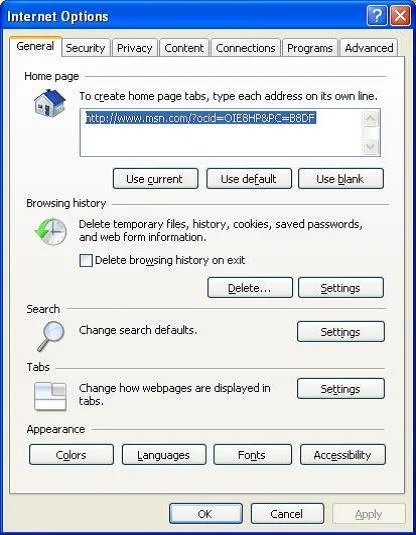
Options
- ASet the Disable the Advanced Page state to Enabled, and set the Turn off InPrivate Browsing
- BSet the Turn off InPrivate Filtering state to Enabled, and set the Disable the General Page
- CSet the Turn off InPrivate Browsing state to Enabled, and set the Disable the General Page
- DSet the Disable the General Page state to Enabled, and set the Disable the Advanced Page
How the community answered
(24 responses)- B13% (3)
- C83% (20)
- D4% (1)
Explanation
InPrivate Browsing in Internet Explorer 8 helps prevent one's browsing history, temporary Internet files, form data, cookies, and usernames and passwords from being retained by the browser, leaving no easily accessible evidence of browsing or search history. run IE InPrivate Browsing will not keep any history or logging. General Page able to clear IE history untitled
Topics
Community Discussion
No community discussion yet for this question.