
Microsoft
70-685 · Question #2
All client computers on your company network run Windows 7. Several legacy software applications are made available on the computers by using Windows XP Mode (XPM). Employees report that all Start…
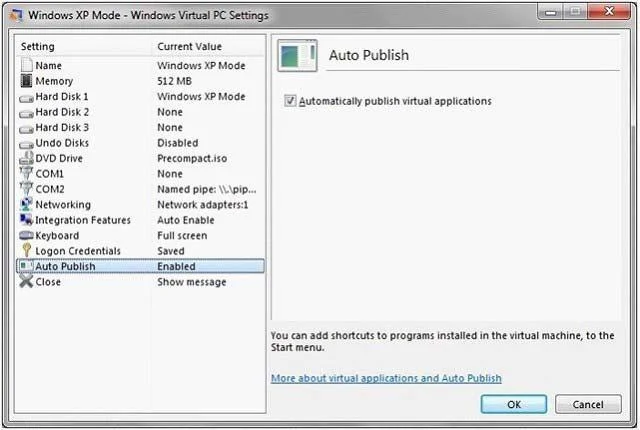
The correct answer is D. Enable the Auto Publish option for Virtual Machine Settings on the Windows 7 computers. windows-virtualpc.aspx
Deploy Windows 7 and Microsoft Office 2010
Question
All client computers on your company network run Windows 7. Several legacy software applications are made available on the computers by using Windows XP Mode (XPM). Employees report that all Start menu shortcuts for the legacy applications are missing from their computers. You need to ensure that all employees can access the Start menu shortcuts for the legacy applications. What should you do?
Exhibit
Options
- ACopy the program icons to the Start menu of the Windows 7 computers.
- BReinstall the applications on the XPM machines and select the repair option.
- CConfigure the applications as Default Programs on the Windows 7 computers.
- DEnable the Auto Publish option for Virtual Machine Settings on the Windows 7 computers.
How the community answered
(36 responses)- A3% (1)
- B17% (6)
- C8% (3)
- D72% (26)
Explanation
windows-virtualpc.aspx
Topics
#Windows XP Mode#Auto Publish#Start menu integration#application virtualization
Community Discussion
No community discussion yet for this question.