
70-685 · Question #11
All client computers on your company network run Windows 7 and all servers on your company network run Windows Server 2008. The computers and the servers are members of an Active Directory Domain…
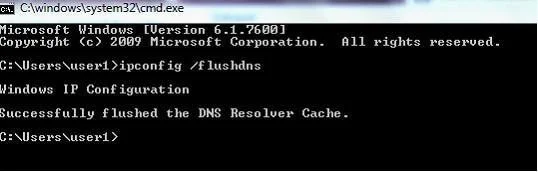
The correct answer is D. Run the ipconfig /flushdns command on the employees' computers. Whenever you type a URL into a Web browser, your PC asks your domain name service server (DNS server) to translate that URL into an IP address, and caches that information. That cache can occasionally become outdated or corrupt, which can cause Internet connection problems. You…
Question
All client computers on your company network run Windows 7 and all servers on your company network run Windows Server 2008. The computers and the servers are members of an Active Directory Domain Services domain. A network administrator moves the Internet Information Services (IIS) server to a different network segment and configures the appropriate network settings. Employees are unable to connect to the IIS server. You confirm that the network settings are appropriate. You need to ensure that all employees are able to connect to the IIS server. What should you do?
Exhibit
Options
- ARestart the DNS Client service on the DNS servers.
- BRestart the DNS Server service on the DNS servers.
- CRun the nbtstat r command on the employees' computers.
- DRun the ipconfig /flushdns command on the employees' computers.
How the community answered
(50 responses)- A4% (2)
- B4% (2)
- C10% (5)
- D82% (41)
Explanation
Whenever you type a URL into a Web browser, your PC asks your domain name service server (DNS server) to translate that URL into an IP address, and caches that information. That cache can occasionally become outdated or corrupt, which can cause Internet connection problems. You can use the ipconfig /flushdns command to flush and reset the contents of the Domain Name System (DNS) client resolver cache. During DNS troubleshooting, if necessary, you can use this procedure to discard negative cache entries from the cache, as well as any other dynamically Resetting the cache does not eliminate entries that are preloaded from the local Hosts file. To eliminate those entries from the cache, remove them from this file. Membership in Administrators, or equivalent, is the minimum required to complete this procedure. To flush and reset a client resolver cache: Open a command prompt. To open an elevated Command Prompt window, click Start, point to All Programs, click Accessories, right-click Command Prompt, and then click Run as administrator. At a command prompt, type the following command, and then press ENTER:
Topics
Community Discussion
No community discussion yet for this question.