
70-669 · Question #96
A university is deploying folder redirection for the members of the Students, Staff, and Faculty Active Directory Domain Services (AD DS) se groups. All client computers run Windows 7. Currently…
The correct answer is C. Deploy a single Group Policy object and use the Advanced-Specify locations for various. Basic Redirection and Advanced Redirection Basic Redirection and Advanced Redirection are available to all folders listed in the snap- in. You use basic redirection when you store the selected folder in the Group Policy object on the same share for all users. You use Advanced…
Question
A university is deploying folder redirection for the members of the Students, Staff, and Faculty Active Directory Domain Services (AD DS) se groups. All client computers run Windows 7. Currently, there are no redirection policies in place. The IT department requires that members of each security group store data on a separate file server. Each user must have access to only data from any client computer. You need to enable folder redirection for all of the users. What should you do?
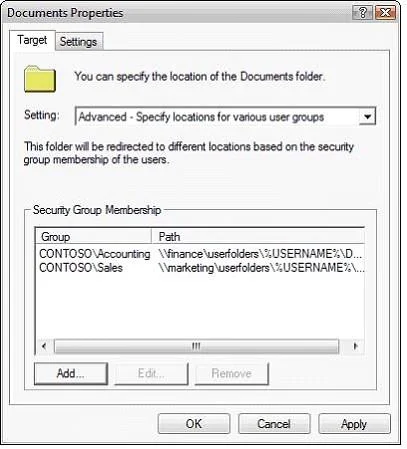
Exhibit
Options
- ADeploy a single Group Policy object and use the Grant the user exclusive rights setting.
- BDeploy a single Group Policy object and use the Also apply redirection policy to Windows
- CDeploy a single Group Policy object and use the Advanced-Specify locations for various
- DDeploy three Group Policy objects and use the Redirect to the local user profile location
How the community answered
(46 responses)- A4% (2)
- B9% (4)
- C74% (34)
- D13% (6)
Explanation
Basic Redirection and Advanced Redirection Basic Redirection and Advanced Redirection are available to all folders listed in the snap- in. You use basic redirection when you store the selected folder in the Group Policy object on the same share for all users. You use Advanced Redirection when you want to redirect the selected folder to a different location based on a security group membership of the user. For example, you would use Advanced Folder Redirection when you want to redirect folders belonging to the Accounting group to the Finance server and folders belonging to the Sales group to the Marketing server. If a user is a member of multiple security groups listed for a specific folder, Folder Redirection will use the path of the first security group that matches for the given user.
Topics
Community Discussion
No community discussion yet for this question.