
Microsoft
70-669 · Question #27
Your company's main office and a branch office are connected by a slow WAN link. All servers run Windows Server 2008 R2. All client computers run Windows 7. You install an application on a Remote…
The correct answer is C. On each client computer,set the display cplors in the Remote Desktop Connection client to. See the full explanation below for the reasoning.
Question
Your company's main office and a branch office are connected by a slow WAN link. All servers run Windows Server 2008 R2. All client computers run Windows 7. You install an application on a Remote Desktop Session Host (RD Session Host) server. Users in the branch office experience slow performance when accessing the application through Remote Desktop. You need to minimize the bandwidth utilization to the RD Session Host server. What should you do?
Exhibit
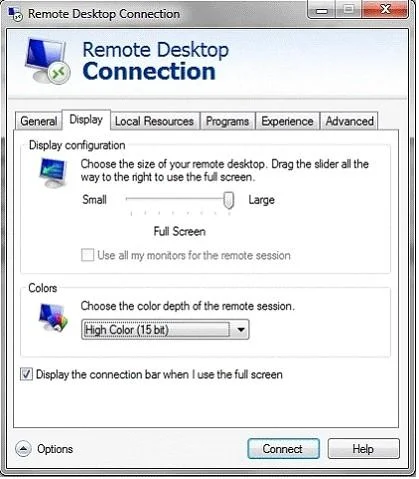
Options
- AConfigure BranchCache in Hosted Cached mode.
- BOn the RD Session Host server, configrue the RDP-TCP properties to allow only Network
- COn each client computer,set the display cplors in the Remote Desktop Connection client to
- DOn each client computer, configure the Connect From Anywhere settings in the Remote
How the community answered
(23 responses)- A13% (3)
- B4% (1)
- C74% (17)
- D9% (2)
Community Discussion
No community discussion yet for this question.