
70-669 · Question #124
All client computers on your network run Windows 7 Enterprise. You are deploying Windows XP Mode images on the Windows 7 computers. You need to copy data to a folder within a Windows XP Mode image…
The correct answer is A. Disk Management. One tool that comes with Windows 7 is very handy when customizing Windows XP Mode images, That tool is Diskpart. By using Diskpart, you can attach a Windows XP VHD to the computer, add or remove files from the image, and then detach the VHD from the computer. You can also use…
Question
All client computers on your network run Windows 7 Enterprise. You are deploying Windows XP Mode images on the Windows 7 computers. You need to copy data to a folder within a Windows XP Mode image without starting the virtual machine. Which tool should you use first?
Exhibit
Options
- ADisk Management
- BDevice Manager
- Cfdisk.exe
- DDisk Cleanup
How the community answered
(40 responses)- A75% (30)
- B5% (2)
- C15% (6)
- D5% (2)
Explanation
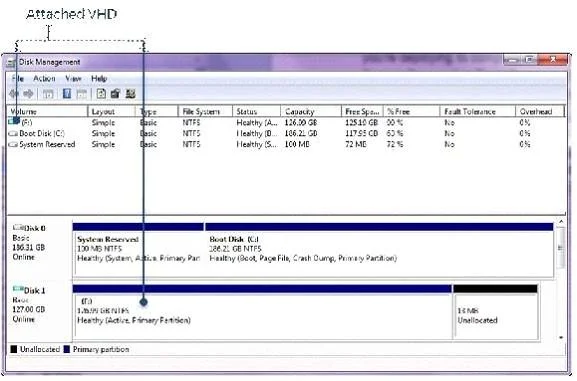
One tool that comes with Windows 7 is very handy when customizing Windows XP Mode images, That tool is Diskpart. By using Diskpart, you can attach a Windows XP VHD to the computer, add or remove files from the image, and then detach the VHD from the computer. You can also use the Disk Management to attach the Windows XP VHD: On the Start menu, type disk management, and click create and format hard disk partitions. Click Action and click Attach VHD. In the Location box, type the path and file name of the VHD you want to edit or click Browse to Click OK to mount the VHD to a drive letter (Figure 1). Figure 1. An attached VHD By using Windows Explorer and other tools, edit the VHD as necessary. For example, you can add files to the VHD, edit a settings file, or even delete files from the VHD. In the Disk Management console, right-click the attached VHD, and click Detach VHD. Click OK to confirm that you want to detach the VHD.
Topics
Community Discussion
No community discussion yet for this question.