
70-659 · Question #20
You have a stand-alone server named SERVER01 that runs Windows Server 2008 R2 Enterprise with service Pack l and Hyper-V. The server hosts 12 virtual machines (VMs). You add Hyper-V on a new server…
Sign in or unlock 70-659 to reveal the answer and full explanation for question #20. The question stem and answer options stay visible for context.
Question
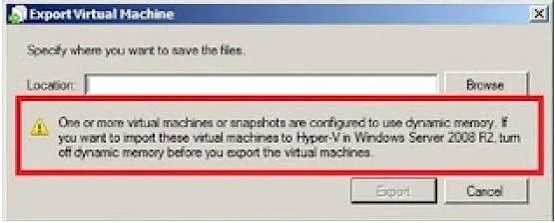
You have a stand-alone server named SERVER01 that runs Windows Server 2008 R2 Enterprise with service Pack l and Hyper-V. The server hosts 12 virtual machines (VMs). You add Hyper-V on a new server named SERVER02. SERVER02 runs Windows Server 2008 R2 Enterprise. One of the VMs on SERVER01 is configured to use dynamic memory. You export the VM. The VM cannot be imported on SERVER02. You prepare to export the VM again. You need to ensure that the exported VM can be imported on SERVER02. What should you do?
Exhibit
Options
- ARemove all DVD drive media from the VM.
- BConfigure the VM to use static memory.
- CStart the VM and allow it to run.
- DStart and then pause the VM.
Unlock 70-659 to see the answer
You've previewed enough free 70-659 questions. Unlock 70-659 for full answers, explanations, the timed quiz mode, progress tracking, and the master PDF. Question stem and options stay visible so you can still see what's on the exam.