nerdexam
Microsoft

70-659 · Question #135

70-659 Question #135: Real Exam Question with Answer & Explanation

The correct answer is A. Set the placement goal to Load balancing. C. Set the resource importance of the disk I/O to Very Important.. Using Host Ratings to Select Hosts You can establish customized default criteria for VMM to use when rating hosts during placement. This helps you to place virtual machines on the most suitable host. You can specify the placement goal that VMM should use to calculate hosts rating

Question

You are using Microsoft System Center Virtual Machine Manager (VMM) 2008 R2 to perform a virtual-to-virtual (V2V) conversion. You need to place the virtual machine (VM) on the host server that has the most available disk I/O. Which two actions should you perform? (Each correct answer presents part of the solution. Choose two.)

Exhibit
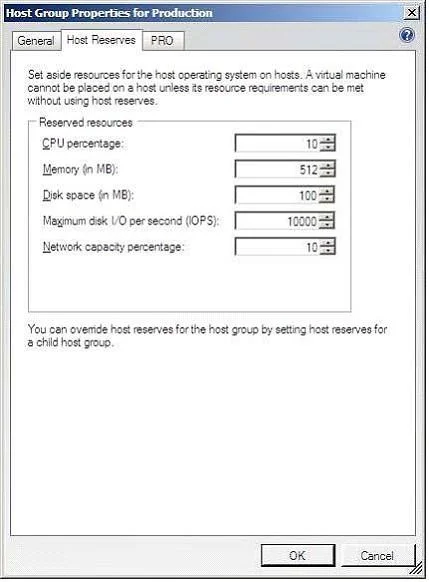
70-659 question #135 exhibit

Options

  • ASet the placement goal to Load balancing.
  • BSet the placement goal to Resource maximization.
  • CSet the resource importance of the disk I/O to Very Important.
  • DSet the maximum disk I/O per second for the host reserves to 10000.

Explanation

Using Host Ratings to Select Hosts You can establish customized default criteria for VMM to use when rating hosts during placement. This helps you to place virtual machines on the most suitable host. You can specify the placement goal that VMM should use to calculate hosts ratings. The placement goals are described in the following table: You can also specify the relative importance of each of the following resources that VMM should use when rating hosts: Memory utilization Network utilization For example, if you create a Windows Server2008-based virtual machine for developers and you know that the virtual machine requires significant CPU, however the host has relatively little hard disk or network resources, you might customize the default ratings to increase the priority of free CPU while lowering the priority of the hard disk and network. Setting Host Reserves Host Reservesdefine how much of a host's resources are to be reserved for the host operating system. Once these reserves are configured, a virtual machine cannot be deployed on that host if doing so would require the use of those reserved resources. The host resources that may be reserved are as follows: Maximum Disk I/O Per Second (IOPS) NetworkCapacityPercentage Host reserves are specified on a host group basis. In addition, the group reserve settings may also be overridden on a per host basis. To specify the host group reserve settings, right click on the host group name in the Hosts pane, selectPropertiesfrom the menu and click theHost Reserve Tabsin theHost Group Propertiesdialog as illustrated in the following figure: In order to override the group host reserve settings, right click on the host in the list, selectPropertiesand click onReservesin the resulting dialog.

Community Discussion

No community discussion yet for this question.

Full 70-659 Practice