70-649 · Question #126
You install a read-only domain controller (RODC) named RODC1. You need to ensure that a user named User1 can administer RODC1. The solution must minimize the number of permissions assigned to User1…
The correct answer is B. Active Directory Users and Computers. The old answer was: Dsmgmt There are a couple of ways to achieve this and two of them are mentioned in the listed answers, ActiveDirectory Users and Computers and Dsmgmt. AdministratorRole Separation on an RODC, and why the use of Active Directory Users is recommended over…
Question
You install a read-only domain controller (RODC) named RODC1. You need to ensure that a user named User1 can administer RODC1. The solution must minimize the number of permissions assigned to User1. Which tool should you use?
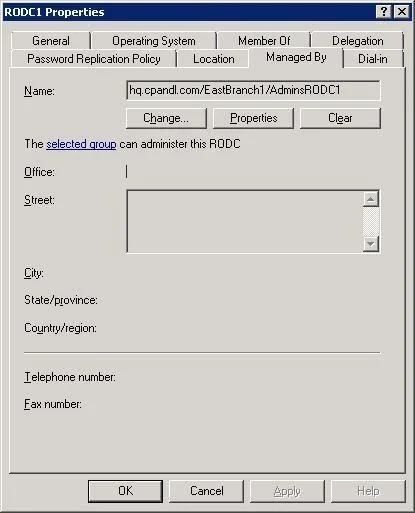
Exhibit
Options
- AActive Directory Administrative Center
- BActive Directory Users and Computers
- CDsadd
- DDsmgmt
How the community answered
(21 responses)- B76% (16)
- C14% (3)
- D10% (2)
Explanation
The old answer was: Dsmgmt There are a couple of ways to achieve this and two of them are mentioned in the listed answers, ActiveDirectory Users and Computers and Dsmgmt. AdministratorRole Separation on an RODC, and why the use of Active Directory Users is recommended over Dsmgmt. Thesecond reference is now a kind of bonus, explaining how to use dsmgmt for this task. Delegating local administration of an RODC Administrator Role Separation (ARS) is an RODC feature that you can use to delegate the ability to administeran RODC to a user or a security group. When you delegate the ability to log on toan RODC to a user or asecurity group, the user or group is not added the Domain Admins group and therefore does not haveadditional rights to perform directory service operations. Steps and best practices for setting up ARS You can specify a delegated RODC administrator during an RODC installation or after it. To specify thedelegated RODC administrator after installation, you can use either of the following Modify the Managed By tab of the RODC account properties in the Active Directory Users and Computerssnap-in, as shown in the following figure. You can click Change to change which securityprincipal is the delegated RODC administrator. You can choose only one security principal. Specify a securitygroup rather than an individual user so you can control RODC administration permissions most efficiently. Thismethod changes the managedBy attribute of the computer object that corresponds to the RODC to the SID ofthe security principal that you specify. This is the recommended way to specify the delegated RODCadministrator account because the information is stored in AD DS, where it can be centrally managed bydomain administrators. Use the ntdsutil local roles command or the dsmgmt local roles command. You can use this command to view,add, or remove members from the Administrators group and other built-in groups on the RODC. [See also thesecond reference for more information on how to use dsmgmt.] Using ntdsutil or dsmgmt to specify the delegated RODC administrator account is not recommendedbecause the information is stored only locally on the RODC. Therefore, when you use ntdsutil local roles todelegate an administrator for the RODC, the account that you specify does not appear on the Managed By tabof the RODC account properties. As a result, using the Active Directory Users and Computers snap-in or asimilar tool will not reveal that the RODC has a delegated administrator. In addition, if you demote an RODC, any security principal that you specified by using ntdsutil local rolesremains stored in the registry of the server. This can be a security concern if you demote an RODC in onedomain and then promote it to be an RODC again in a different domain. In that case, the original securityprincipal would have administrative rights on the new RODC in the different domain. Administrator Role Separation Configuration This section provides procedures for creating a local administrator role for an RODC and for adding a user tothat role. To configure Administrator Role Separation for an RODC 1. Click Start, click Run, type cmd, and then press ENTER. 2. At the command prompt, type dsmgmt.exe, and then press ENTER. 3. At the DSMGMT prompt, type local roles, and then press ENTER. 4. For a list of valid parameters, type ?, and then press ENTER. By default, no local administrator role is defined on the RODC after AD DS installation. To add the localadministrator role, use the 5. Type add <DOMAIN><user> <administrative role> For example, type add CONTOSO\testuser administrators
Topics
Community Discussion
No community discussion yet for this question.
