
70-648 · Question #71
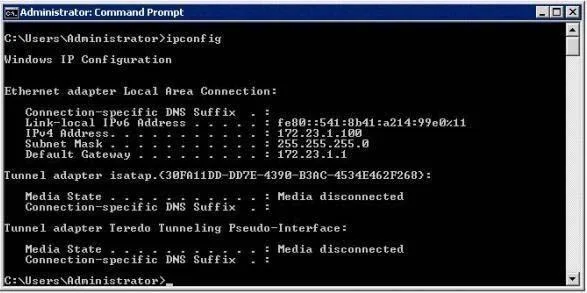
Your network contains a server that runs Windows Server 2008 R2. On the server, you run ipconfig.exeas shown in the exhibit. (Click the Exhibit button.) You need to ensure that the server can access…
The correct answer is C. Configure an IPv6 address. In the exhibit, the interface is using a link-local IPv6 address - the IPv6 equivalent of APIPA. This means it really has no access to IPv6 hosts that are assigned a specific address in that environment. Configuring a static address would remedy this. We do not need to add a…
Question
Your network contains a server that runs Windows Server 2008 R2. On the server, you run ipconfig.exeas shown in the exhibit. (Click the Exhibit button.) You need to ensure that the server can access remote TCP/IPv6 hosts. What should you do? Microsoft 70-648 Exam
Exhibit
Options
- AAdd a default gateway.
- BModify the subnet mask.
- CConfigure an IPv6 address.
- DDisable Internet Protocol Version 4 (TCP/IPv4).
How the community answered
(36 responses)- A14% (5)
- B3% (1)
- C75% (27)
- D8% (3)
Explanation
In the exhibit, the interface is using a link-local IPv6 address - the IPv6 equivalent of APIPA. This means it really has no access to IPv6 hosts that are assigned a specific address in that environment. Configuring a static address would remedy this. We do not need to add a default gateway, one is already available for IPv4. As long as that gateway can handle IPv6, we would be able to send requests to it once we are on the IPv6 network. If that gateway couldn't handle IPv6 then we would need to change the gateway. The IPv4 subnet mask is correct for the currently assigned IPv4 address. Disabling IPv4 at this point would kill all connectivity the machine has, as it currently is not assigned an IPv6 address on the network (it's merely using link-local addressing)
Topics
Community Discussion
No community discussion yet for this question.