
70-648 · Question #3
Microsoft 70-648 Exam Your company has a main office and 40 branch offices. Each branch office is configured as a separate Active Directory site that has a dedicated read-only domain controller…
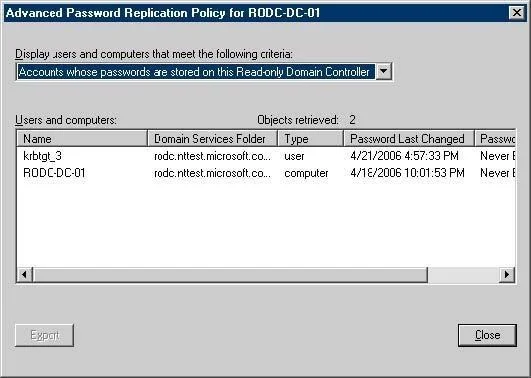
The correct answer is D. Active Directory Users and Computers. To view current credentials that are cached on an RODC 1. Click Start, click Administrative Tools, and then click Active Directory Users and Computers. 2. Ensure that Active Directory Users and Computers points to the writable domain controller that is running Windows Server…
Question
Microsoft 70-648 Exam Your company has a main office and 40 branch offices. Each branch office is configured as a separate Active Directory site that has a dedicated read-only domain controller (RODC). An RODC server is stolen from one of the branch offices. You need to identify the user accounts that were cached on the stolen RODC server. Which utility should you use?
Exhibit
Options
- Adsmod.exe
- Bntdsutil.exe
- CActive Directory Sites and Services
- DActive Directory Users and Computers
How the community answered
(38 responses)- A8% (3)
- B3% (1)
- C11% (4)
- D79% (30)
Explanation
To view current credentials that are cached on an RODC 1. Click Start, click Administrative Tools, and then click Active Directory Users and Computers. 2. Ensure that Active Directory Users and Computers points to the writable domain controller that is running Windows Server 2008, and then click Domain Controllers. 3. In the details pane, right-click the RODC computer account, and then click Properties. 4. Click the Password Replication Policy tab. 5. Click Advanced. 6. In the drop-down list, click Accounts whose passwords are stored on this Read-only Domain Controller, as shown in the following illustration. 29.aspx#bkmk_View_CredsOnRODC
Topics
Community Discussion
No community discussion yet for this question.