
70-647 · Question #120
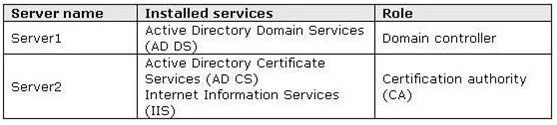
Your network consists of one Active Directory domain that contains servers that run Windows Server 2008 R2. The relevant servers are configured as shown in the following table. (Click the Exhibit)…
The correct answer is D. On Server1, enable auto-enrollment in the Computer Settings section of the Default Domain. To enable all client computers to automatically request and install computer certificates, you need to enable the Autoenrollment Settings Policy under Public Key Policies on Server1 in the User Configuration section of the Default Domain. Autoenrollment automatically downloads…
Question
Your network consists of one Active Directory domain that contains servers that run Windows Server 2008 R2. The relevant servers are configured as shown in the following table. (Click the Exhibit) All client computers are members of the domain and run Windows 7. All users have accounts in the domain. You need to recommend a solution that enables all client computers to automatically request and install computer certificates. What should you recommend?
Exhibit
Options
- AOn Server2, implement the Network Device Enrollment Service.
- BOn Server2, implement certification authority Web enrollment support.
- COn Server1, enable auto-enrollment in the User Configuration section of the Default Domain
- DOn Server1, enable auto-enrollment in the Computer Settings section of the Default Domain
How the community answered
(44 responses)- A5% (2)
- B16% (7)
- C9% (4)
- D70% (31)
Explanation
To enable all client computers to automatically request and install computer certificates, you need to enable the Autoenrollment Settings Policy under Public Key Policies on Server1 in the User Configuration section of the Default Domain. Autoenrollment automatically downloads root certificates and cross-certificates from the Active Directory whenever a change is detected in the directory, or when a different domain controller is contacted. If a third party root certificate or cross- certificate is deleted from the local machine store, Autoenrollment will not download the certificates again until a change occurs in Active Directory, or a new domain controller is contacted.
Topics
Community Discussion
No community discussion yet for this question.