
70-642 · Question #441
Your network contains a DNS zone for contoso.com. All servers register their host names in DNS by using dynamic updates. The network contains a server named server1.contoso.com. From a computer…
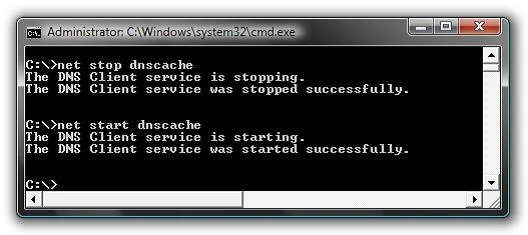
The correct answer is D. Restart the DNS Client service. Have you ever had an issue where you continually get DNS errors while trying to browse, but another computer on the same network is working just fine? The problem is most likely that you need to reload your DNS cache on that machine. You can tackle this problem two ways, first…
Question
Your network contains a DNS zone for contoso.com. All servers register their host names in DNS by using dynamic updates. The network contains a server named server1.contoso.com. From a computer named Computer1 that runs Windows 7, you successfully resolve serverl.contoso.com to an IP address. You change the IP address of serverl.contoso.com. From Computer1, you discover that serverl.contoso.com still resolves to the old IP address. You successfully connect to serverl.contoso.com by using the new IP address. You need to ensure that you can immediately resolve serverl.contoso.com to the new IP address. What should you do on Computer1?
Exhibit
Options
- ARestart the Network Location Awareness service.
- BRun dnscacheugc.exe.
- CRestart the Computer Browser service.
- DRestart the DNS Client service.
How the community answered
(23 responses)- A9% (2)
- B4% (1)
- C4% (1)
- D83% (19)
Explanation
Have you ever had an issue where you continually get DNS errors while trying to browse, but another computer on the same network is working just fine? The problem is most likely that you need to reload your DNS cache on that machine. You can tackle this problem two ways, first by just clearing the cache, but also by restarting the DNS client service, which handles caching of DNS lookups. - Clear DNS Cache ipconfig /flushdns - net stop dnscache net start dnscache
Topics
Community Discussion
No community discussion yet for this question.