
Microsoft
70-642 · Question #359
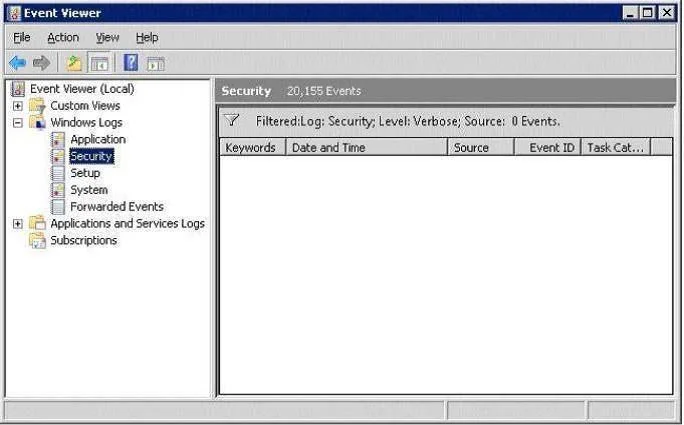
Your network contains a server named Server1 that runs Windows Server 2008 R2 Service Pack 1 (SP1). You log on to Server1 by using an account named Admin1, and then you open Event Viewer as shown in…
The correct answer is E. From Event Viewer, right-click Security, and then click Clear Filter. See the full explanation below for the reasoning.
Question
Your network contains a server named Server1 that runs Windows Server 2008 R2 Service Pack 1 (SP1). You log on to Server1 by using an account named Admin1, and then you open Event Viewer as shown in the exhibit. (Click the Exhibit button.) You need to ensure that you can view all of the events in the Security log. What should you do?
Exhibit
Options
- AFrom the Local Group Policy Editor, set Retain old events to Enabled for the Security log.
- BFrom a command prompt, run net localgroup /add "Event Log Readers" Admin1.
- CFrom Event Viewer, right-click Security, and then click Refresh.
- DFrom the Local Group Policy Editor, set Log access to Enabled for the Security log.
- EFrom Event Viewer, right-click Security, and then click Clear Filter.
How the community answered
(50 responses)- A2% (1)
- B4% (2)
- C16% (8)
- D6% (3)
- E72% (36)
Community Discussion
No community discussion yet for this question.