
Microsoft
70-642 · Question #278
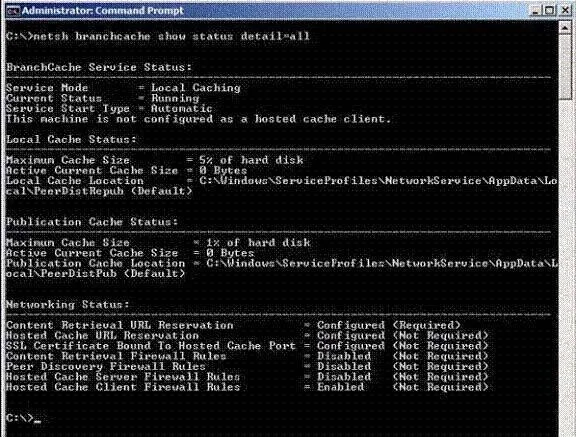
Your network contains a server named Server1 that runs Windows Server 2008 R2. Server1 is located in a branch office. You view the BranchCache configuration of Server1 as shown in the exhibit…
The correct answer is D. Run netsh.exe branchcache set service mode=HOSTEDSERVER. See the full explanation below for the reasoning.
Question
Your network contains a server named Server1 that runs Windows Server 2008 R2. Server1 is located in a branch office. You view the BranchCache configuration of Server1 as shown in the exhibit. (Click the Exhibit button.) You need to ensure that client computers in the branch office retrieve cached files from Server1 only. What should you do on Server1?
Exhibit
Options
- AInstall the BranchCache for Network Files role service.
- BInstall the Services for Network File System role service.
- CRun netsh.exe branchcache set service mode=DISTRIBUTED.
- DRun netsh.exe branchcache set service mode=HOSTEDSERVER.
How the community answered
(22 responses)- A5% (1)
- B9% (2)
- C5% (1)
- D82% (18)
Community Discussion
No community discussion yet for this question.