
70-642 · Question #142
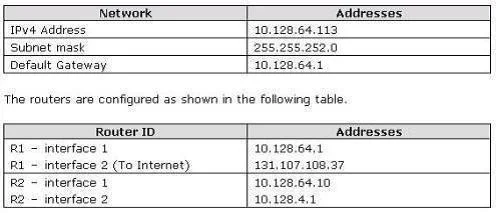
Your company has an IPv4 Ethernet network. A router named R1 connects your segment to the Internet. A router named R2 joins your subnet with a segment named Private1. The Private1 segment has a…
The correct answer is C. Route add-p 10.128.4.0 mask 255.255.255.192 10.128.64.1. For example, to add a static route to the 10.0.0.0 network that uses a subnet mask of 255.0.0.0, a gateway of 192.168.0.1, you type the following at a command prompt: route add 10.0.0.0 mask 255.0.0.0 192.168.0.1
Question
Your company has an IPv4 Ethernet network. A router named R1 connects your segment to the Internet. A router named R2 joins your subnet with a segment named Private1. The Private1 segment has a network address of 10.128.4.0/26. Your computer named WKS1 requires access to servers on the Private1 network. The WKS1 computer configuration is as shown in the following table. WKS1 is unable to connect to the Private1 network by using the current configuration. You need to add a persistent route for the Private1 network to the routing table on WKS1. Which command should you run on WKS1?
Exhibit
Options
- ARoute add-p 10.128.4.0/22 10.128.4.1
- BRoute add-p 10.128.4.0/26 10.128.64.10
- CRoute add-p 10.128.4.0 mask 255.255.255.192 10.128.64.1
- DRoute add-p 10.128.64.10 mask 255.255.255.192 10.128.4.0
How the community answered
(37 responses)- A3% (1)
- B11% (4)
- C78% (29)
- D8% (3)
Explanation
For example, to add a static route to the 10.0.0.0 network that uses a subnet mask of 255.0.0.0, a gateway of 192.168.0.1, you type the following at a command prompt: route add 10.0.0.0 mask 255.0.0.0 192.168.0.1
Topics
Community Discussion
No community discussion yet for this question.