
70-642 · Question #100
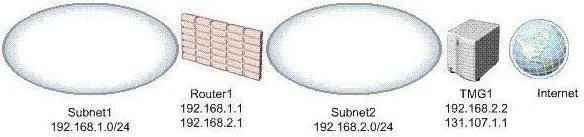
Your network is configured as shown in the exhibit. (Click the Exhibit button.) The network contains a server named TMG1. TMG1 runs Microsoft Forefront Threat Management Gateway (TMG) 2010 and has a…
The correct answer is A. Run route-p add 192.168.1.0 netmask 255.255.255.0 192.168.2.1. For example, to add a static route to the 10.0.0.0 network that uses a subnet mask of 255.0.0.0, a gateway of 192.168.0.1, you type the following at a command prompt: Route add 10.0.0.0 mask 255.0.0.0 192.168.0.1
Question
Your network is configured as shown in the exhibit. (Click the Exhibit button.) The network contains a server named TMG1. TMG1 runs Microsoft Forefront Threat Management Gateway (TMG) 2010 and has a default gateway of 131.107.1.2. You need to ensure that TMG1 can connect to the Internet and to the client computers in all of the internal subnets. What should you do on TMG1?
Exhibit
Options
- ARun route-p add 192.168.1.0 netmask 255.255.255.0 192.168.2.1.
- BChange the default gateway to 192.168.1.1.
- CRun route-p add 192.168.2.0 netmask 255.255.255.0 192.168.1.1.
- DChange the default gateway to 192.168.2.1.
How the community answered
(60 responses)- A80% (48)
- B3% (2)
- C12% (7)
- D5% (3)
Explanation
For example, to add a static route to the 10.0.0.0 network that uses a subnet mask of 255.0.0.0, a gateway of 192.168.0.1, you type the following at a command prompt: Route add 10.0.0.0 mask 255.0.0.0 192.168.0.1
Topics
Community Discussion
No community discussion yet for this question.