
70-516 · Question #240
You use Microsoft Visual Studio 2010 and Microsoft .NET Framework 4 to create an application. The application connects to a Microsoft SQL Server database. You use the ADO.NET LINQ to SQL model to…
Sign in or unlock 70-516 to reveal the answer and full explanation for question #240. The question stem and answer options stay visible for context.
Question
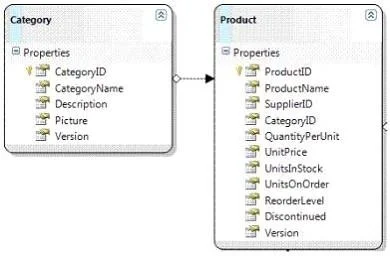
You use Microsoft Visual Studio 2010 and Microsoft .NET Framework 4 to create an application. The application connects to a Microsoft SQL Server database. You use the ADO.NET LINQ to SQL model to retrieve data from the database. The application contains the Category and Product entities, as shown in the following exhibit. You need to ensure that LINQ to SQL executes only a single SQL statement against the database. You also need to ensure that the query retrieves the list of categories and the list of products. Which code segment should you use?
Exhibit
Options
- AUsing dc As New NorthwindDataContext()
- BUsing dc As New NorthwindDataContext()
- CUsing dc As New NorthwindDataContext()
- DUsing dc As New NorthwindDataContext()
Unlock 70-516 to see the answer
You've previewed enough free 70-516 questions. Unlock 70-516 for full answers, explanations, the timed quiz mode, progress tracking, and the master PDF. Question stem and options stay visible so you can still see what's on the exam.