
Microsoft
70-511 · Question #83
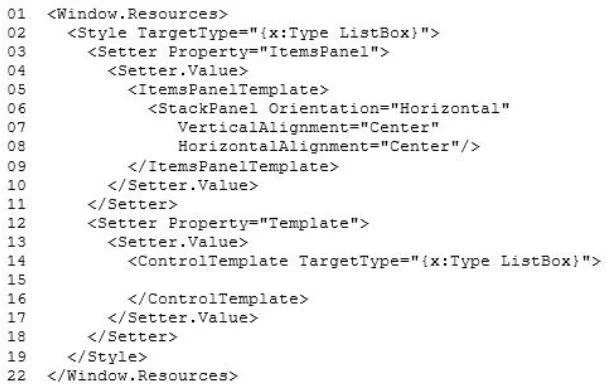
You are developing a Windows Presentation Foundation (WPF) application. The window has the following markup. (Line numbers are included for reference only.) You need to ensure that all ListBox…
The correct answer is A. <Border Background=" \TemplateBindding ListBox.Background} ">. See the msdn link with this example:
Manage application lifecycle
Question
You are developing a Windows Presentation Foundation (WPF) application. The window has the following markup. (Line numbers are included for reference only.) You need to ensure that all ListBox controls have a border that matches the background color of the ListBox template. Which markup segment should you insert at line 15?
Exhibit
Options
- A<Border Background=" \TemplateBindding ListBox.Background} ">
- B<Border Background="\Binding ListBox.Background}">
- C<Border Background="{TemplateBinding ListBox.Background} ">
- D<Border Background="{Binding ListBox.Background}">
How the community answered
(17 responses)- A82% (14)
- C6% (1)
- D12% (2)
Explanation
See the msdn link with this example:
Topics
#WPF#TemplateBinding#ListBox#XAML markup
Community Discussion
No community discussion yet for this question.