
70-511 · Question #76
You are developing a Windows Presentation Foundation (WPF) application for managing student information. You place a Button control named btnSort and a DataGrid control named dgStudents on the…
Sign in or unlock 70-511 to reveal the answer and full explanation for question #76. The question stem and answer options stay visible for context.
Question
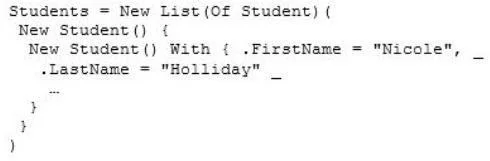
You are developing a Windows Presentation Foundation (WPF) application for managing student information. You place a Button control named btnSort and a DataGrid control named dgStudents on the design surface of the MainWindow.xaml file. You create a Student class with two properties:
FirstName and LastName. You create the following code segment in the constructor of the main window. The DataGrid control displays the list of students unsorted. You need to ensure that the list of students is sorted by last name. Which code segment should you add to the click event handler of the Button control?
Exhibit
Options
- AIEnumerable<Student> sortedStudents =
- BStudents.Sort ();
- CStudents.Reverse ( );
- DIEnumerable<student> sortedStudents =
Unlock 70-511 to see the answer
You've previewed enough free 70-511 questions. Unlock 70-511 for full answers, explanations, the timed quiz mode, progress tracking, and the master PDF. Question stem and options stay visible so you can still see what's on the exam.