
70-499 · Question #310
Your development team uses the Microsoft Visual Studio Scrum 2.0 process template. You are the scrum master. The product owner has created product backlog items and assigned them to a release. You…
The correct answer is B. Review the product backlog with the Forecast option set to on to determine if the release can F. Establish a sprint duration and a sprint velocity. Create enough sprints to complete the G. Estimate effort for each item in the product backlog. By using the forecasting tool in Web Access, you can plan the number of Sprints it will take to complete a set of work. The forecasting tool is available only in the Product Backlog, not any of the Sprint Backlogs. Prior to being able to use the forecasting tool, your Product…
Question
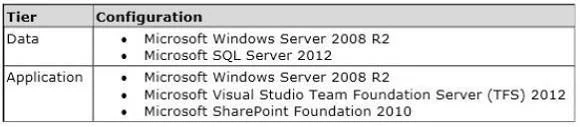
Exhibit
Options
- AReview the sprint backlog.
- BReview the product backlog with the Forecast option set to on to determine if the release can
- CHave the team create tasks for each item in the product backlog and assign hour estimates
- DReview the sprint burndown chart.
- ESet each team member's per day capacity.
- FEstablish a sprint duration and a sprint velocity. Create enough sprints to complete the
- GEstimate effort for each item in the product backlog.
How the community answered
(38 responses)- B82% (31)
- C11% (4)
- D3% (1)
- E5% (2)
Explanation
By using the forecasting tool in Web Access, you can plan the number of Sprints it will take to complete a set of work. The forecasting tool is available only in the Product Backlog, not any of the Sprint Backlogs. Prior to being able to use the forecasting tool, your Product Backlog must have PBI and Bug work items already created with the effort specified. You can turn on forecasting by clicking the Off hyperlink next to Forecast on the right side of the backlog page. The first time you do this, Web Access prompts you for the Velocity. Using your Development Team's Velocity, Web Access will add a Forecast column and horizontal lines to the Product Backlog. In the Forecast column, it will display the Sprint that it predicts the PBI or Bug work item will be developed in. Professional Scrum Development with Microsoft Visual Studio 2012 p.165
Topics
Community Discussion
No community discussion yet for this question.