
Microsoft
70-496 · Question #38
Your network environment is configured according to the following table: Your TFS environment is configured with the following URLs: You need to configure only the TFS URL to be the following fully…
Sign in or unlock 70-496 to reveal the answer and full explanation for question #38. The question stem and answer options stay visible for context.
Question
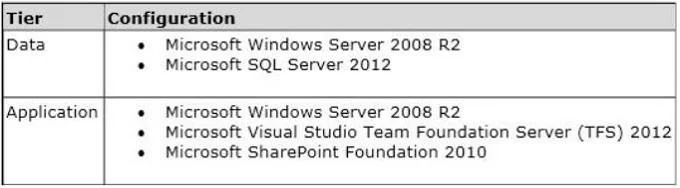
Your network environment is configured according to the following table:
Your TFS environment is configured with the following URLs:
You need to configure only the TFS URL to be the following fully qualified domain name (FQDN):
You log on to the application-tier server. What should you do next?
Exhibit
Options
- AIn the IIS Manager, select TFS Website and configure the host name with the friendly name.
- BIn the TFS Administration Console, go to the Change URIs dialog box and enter the friendly
- CIn the IIS Manager, select TFS Website and configure the server URL with the friendly name.
- DIn the TFS Administration Console, go to the Change URIs dialog box and enter the friendly
Unlock 70-496 to see the answer
You've previewed enough free 70-496 questions. Unlock 70-496 for full answers, explanations, the timed quiz mode, progress tracking, and the master PDF. Question stem and options stay visible so you can still see what's on the exam.