
70-481 · Question #37
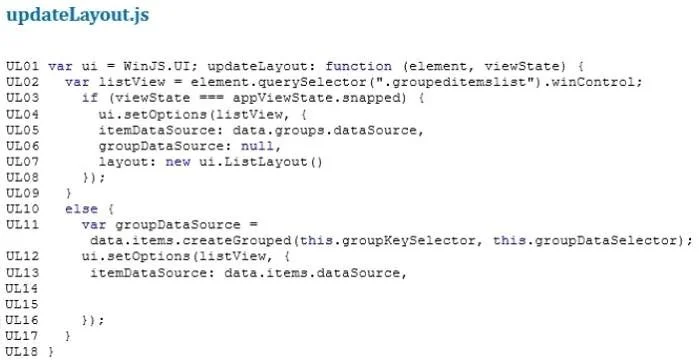
You need to ensure that the app meets the business requirements for user interface design. Which code segment should you insert at line UL15?
The correct answer is C. layout: new ui.GridLayout( ui. ListLayout{ groupHeaderPosition: "left" }). Case Study 4 - Automotive Manufacturer (QUESTION 38 - QUESTION 42) You are developing an app for an automotive manufacturer. The app will display information about the vehicle, the vehicle owner's manual, and the maintenance schedule. The app will be available to install from…
Question
You need to ensure that the app meets the business requirements for user interface design. Which code segment should you insert at line UL15?
Exhibits
Options
- Alayout: new ui.GridLayout({ groupHeaderPosition: "left" })
- Blayout: new ui.GridLayout({ groupHeaderPosition: "top" })
- Clayout: new ui.GridLayout( ui. ListLayout{ groupHeaderPosition: "left" })
- Dlayout: new ui.GridLayout( ui. listLayout{ groupHeaderPosition: "top" })
How the community answered
(23 responses)- A9% (2)
- B4% (1)
- C83% (19)
- D4% (1)
Explanation
Case Study 4 - Automotive Manufacturer (QUESTION 38 - QUESTION 42) You are developing an app for an automotive manufacturer. The app will display information about the vehicle, the vehicle owner's manual, and the maintenance schedule. The app will be available to install from the Windows Store. Business Requirements The app must meet the following business requirements: - Display the company logo on the Main screen. Owner's Manual screen, and Service Record screen of the app. - Allow users to store their vehicle information to identify the correct information to display within the app. - Prominently display a stock image of the user's vehicle on the Main screen at the full height of the app. - Send notifications by using tile updates when a scheduled maintenance is approaching or past due. - Insert service data in the appropriate locations, and update the Service Record screen with data received from a cloud service. - Display related media within the app. Technical Requirements The app must meet the following technical requirements. - The app user interface must follow Microsoft design guidelines. - The user must be able to insert or update service records. - The user must be able to filter service records by date or service - The user must be able to navigate between various parts of the app including but not limited to the Main screen, Service Record screen, and Owner's Manual screen. - The user cannot switch between categories by using the Back button. The data from the cloud service must automatically populate the Service - The Main screen must have a dark background. All other screens must have a light background with contrasting colored text. - All multimedia must provide a full-screen mode that can be activated by the end user. - All media items must start when the user interacts with them and stop immediately when a video ends. - The app must accept and display tile messages and notification messages from the cloud service. - The navigational icons must not be displayed if the content of the screen does not require such display. - Any page of the owner's manual must be able to be pinned to the Windows Start screen. - When the app is pinned to the Windows Start screen all live tile sizes must be available to the users. - When a specific app page is pinned to the Windows Start screen, the page tile cannot be wider or taller than the dimensions of a wide tile. - Short names and display names must not be displayed on square tiles. - The app must use Microsoft Visual Studio preconfigured templates with built-in data structures. - External notifications must be delivered by using Windows Push Notification Services (WNS). - The app must be able to receive push notifications from a Windows Azure Mobile Services endpoint. - Each HTML file must be supported by similarly named JavaScript and CSS files (for example, myFile.html, myFile.js, myFile.css). Application Structure Relevant portions of the app files are shown below. Line numbers in the code segments are included for reference only and include a two-character prefix that denotes the specific file to which they belong. Relevant portions of the app files are shown below. Line numbers in the code segments are included for reference only and include a two-character prefix that denotes the specific file to which they belong. File: manual.html Relevant portions of the app files are shown below. Line numbers in the code segments are included for reference only and include a two-character prefix that denotes the specific file to which they belong. Relevant portions of the app files are shown below. Line numbers in the code segments are included for reference only and include a two-character prefix that denotes the specific file to which they belong. File: service.html Relevant portions of the app files are shown below. Line numbers in the code segments are included for reference only and include a two-character prefix that denotes the specific file to which they belong. File: service.js Relevant portions of the app files are shown below. Line numbers in the code segments are included for reference only and include a two-character prefix that denotes the specific file to which they belong.
Topics
Community Discussion
No community discussion yet for this question.