
70-467 · Question #188
A production SQL Server Analysis Services (SSAS) cube is processed daily. The users query products by using a hierarchy named Products from a dimension named Product. The DimProduct table in the…
The correct answer is B. Relate the Subcategory and Category attributes directly to the Product attribute. The duplicate attribute key error in SSAS occurs because a chained attribute relationship requires intermediate keys to be unique per parent, which fails when SubCategoryKey 23 maps to multiple categories.
Question
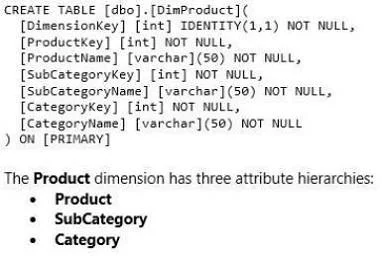
A production SQL Server Analysis Services (SSAS) cube is processed daily. The users query products by using a hierarchy named Products from a dimension named Product. The DimProduct table in the data source view is used as the source of the Product dimension. The table has the following structure. The Product dimension has three attribute hierarchies:
Product Subcategory Category The attributes have the following relationships defined: Product > Subcategory > Category. Each attribute has a key and a name sourced from the related key and name columns in the DimProduct table. During processing, you receive the following error message:
'Errors in the OLAP storage engine:
A duplicate attribute key has been found when processing:
Table: 'dbo_DimProduct', Column:
'SubCategoryKey1, Value:
"23'. The attribute is Subcategory'." You verify that the data is accurate. You need to ensure that the dimension processes successfully. What should you do?
Exhibit
Options
- ADelete the Products hierarchy.
- BRelate the Subcategory and Category attributes directly to the Product attribute.
- CRemove the duplicate data from the DimProduct table.
- DRemove the Subcategory attribute.
How the community answered
(21 responses)- A5% (1)
- B76% (16)
- C5% (1)
- D14% (3)
Why each option
The duplicate attribute key error in SSAS occurs because a chained attribute relationship requires intermediate keys to be unique per parent, which fails when SubCategoryKey 23 maps to multiple categories.
Deleting the Products hierarchy removes the user-facing navigation structure but does not touch the attribute relationships that cause the processing error.
In a chain relationship (Product > Subcategory > Category), SSAS requires each Subcategory key value to resolve unambiguously to a single Category parent; SubCategoryKey 23 appearing under multiple categories violates this constraint and triggers the duplicate key error. Relating Subcategory and Category directly to Product (as sibling attributes) removes the inter-attribute uniqueness requirement between those two levels. This restructuring lets SSAS process each attribute independently against the leaf Product key, eliminating the ambiguity without altering source data.
Removing source data duplicates would only fix the error if the data model were correct, but the root cause is the chained attribute relationship structure, not bad data.
Removing the Subcategory attribute discards useful analytical granularity and is unnecessary because correcting the attribute relationships resolves the error without data loss.
Concept tested: SSAS attribute relationship chain and duplicate key error resolution
Source: https://learn.microsoft.com/en-us/analysis-services/multidimensional-models/attribute-relationships-define
Topics
Community Discussion
No community discussion yet for this question.