
70-466 · Question #134
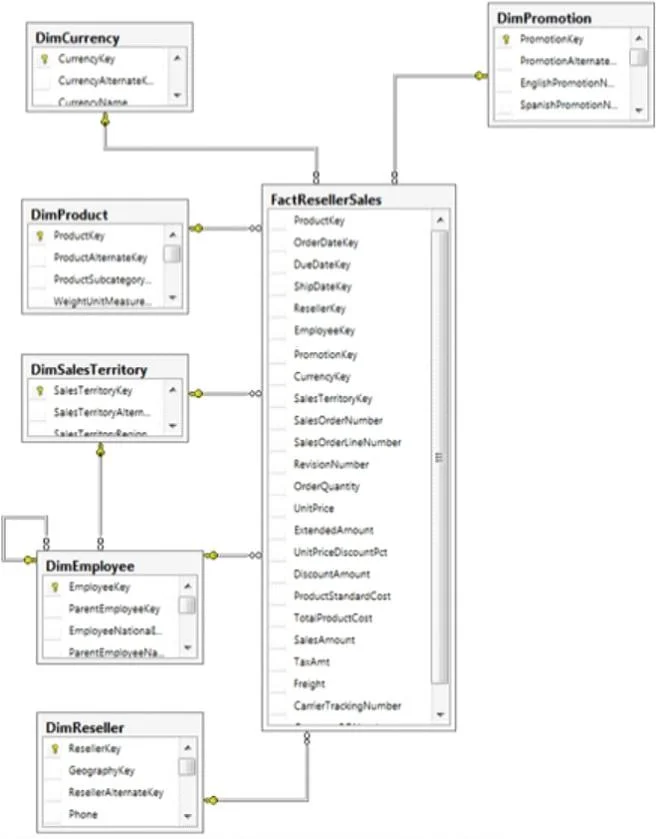
After you deploy the RegionalSales report, users report that they cannot see product data when they receive the reports by email. You need to ensure that the sales department managers can see all of…
The correct answer is A. In When the report is initially run, select Show or hide based on an expression. Set the expression to = (Globals!RenderFormat.IsInteractive). Using Globals!RenderFormat.IsInteractive as the Hidden expression ensures SSRS report groups are fully visible in non-interactive renders like email while preserving interactive toggle behavior in the report portal.
Question
Exhibit
Options
- AIn When the report is initially run, select Show or hide based on an expression. Set the expression to = (Globals!RenderFormat.IsInteractive)
- BIn When the report is initially run, select Show.
- CIn When the report is initially run, select Show or hide based on an expression.
How the community answered
(35 responses)- A83% (29)
- B6% (2)
- C11% (4)
Why each option
Using Globals!RenderFormat.IsInteractive as the Hidden expression ensures SSRS report groups are fully visible in non-interactive renders like email while preserving interactive toggle behavior in the report portal.
When a report is delivered via email subscription, IsInteractive evaluates to False, which sets Hidden to False and makes all group data visible to recipients. When the same report is viewed interactively in the report portal, IsInteractive evaluates to True, keeping the toggle-based drill-down behavior intact for those users. This single expression satisfies both the email visibility requirement and the interactive experience without any hardcoded show or hide setting.
Setting visibility to always Show permanently removes the toggle capability for users who view the report interactively in the portal, degrading their drill-down experience.
Selecting 'Show or hide based on an expression' without specifying the Globals!RenderFormat.IsInteractive expression does not solve the email rendering problem, because the expression itself must check the render format to differentiate between delivery modes.
Concept tested: SSRS group visibility using RenderFormat.IsInteractive for email delivery
Source: https://learn.microsoft.com/en-us/sql/reporting-services/report-design/hide-an-item-report-builder-and-ssrs
Topics
Community Discussion
No community discussion yet for this question.