
70-448 · Question #236
You are an ETL developer for a mortgage company. In your application you have to load data from a Microsoft Excel source and an OLE DB source. The Excel source contains vendor data and has…
The correct answer is B. Set the IsSorted property to True for OLE DB, sort the data in the select statement of the OLE DB. See the full explanation below for the reasoning.
Question
You are an ETL developer for a mortgage company. In your application you have to load data from a Microsoft Excel source and an OLE DB source. The Excel source contains vendor data and has approximately 1000 records. The OLE DB source contains loan data and has approximately 1,000,000 records. Sample vendor data (Excel source) is shown in the following table:
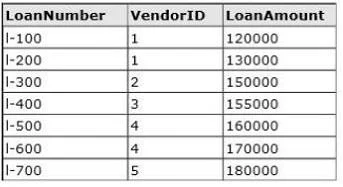
Sample loan data (OLE DB source) is shown in the following table:
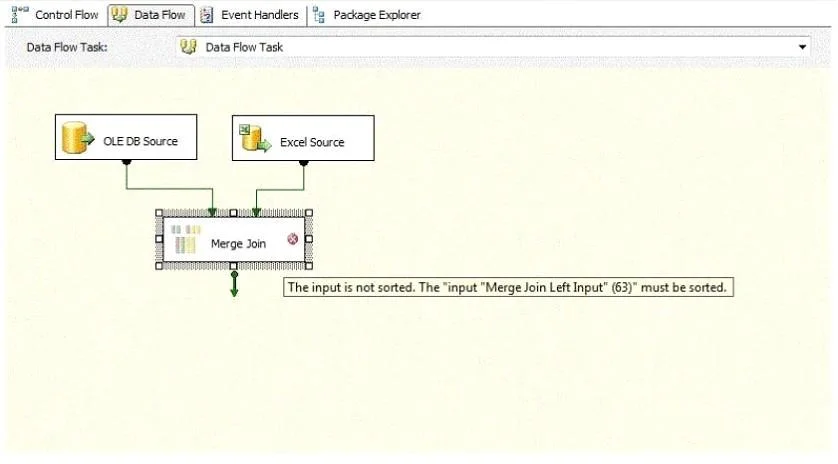
The CIO asks you to generate an Excel file with the loan list information for each vendor. You build a SQL Server 2008 Integration Services (SSIS) package that can generate the Excel files dynamically. The Excel files should have the vendor name as the prefix and the date as the suffix (e.g., VendorA_DDMMYYYY.xlsx). You get the error message shown in the exhibit. (Click the Exhibit button.) You need to sort both sources in order to merge join the data. What should you do?
Exhibits
Options
- ASort the data in the select statement of the OLE DB source and use Sort transformation after the
- BSet the IsSorted property to True for OLE DB, sort the data in the select statement of the OLE DB
- CSet the IsSorted property to True for both the OLE DB and Excel sources.
- DUse Sort transformation after the OLE DB source and set the IsSorted property to True for the Excel
How the community answered
(32 responses)- A9% (3)
- B69% (22)
- C19% (6)
- D3% (1)
Community Discussion
No community discussion yet for this question.