
70-415 · Question #36
Your network contains two Remote Desktop Services (RDS) session collections named Collection 1 and Collection2. Each user has a laptop computer that runs Windows 8. The users frequently log on to…
Sign in or unlock 70-415 to reveal the answer and full explanation for question #36. The question stem and answer options stay visible for context.
Question
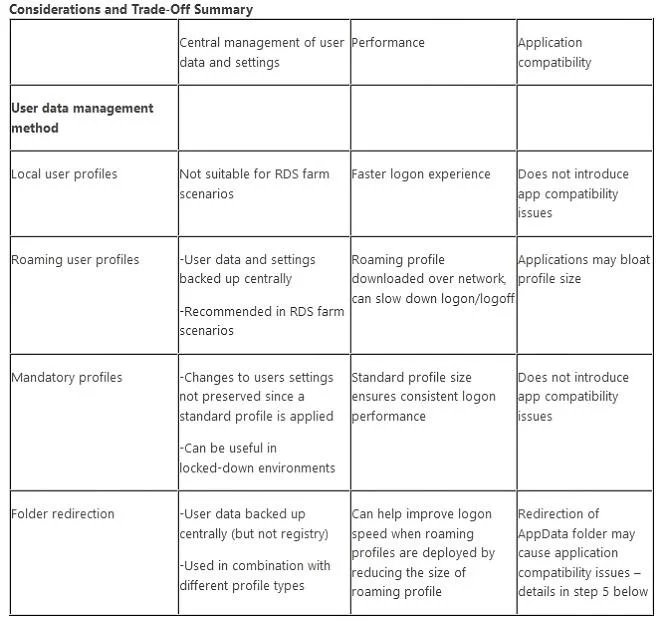
Your network contains two Remote Desktop Services (RDS) session collections named Collection 1 and Collection2. Each user has a laptop computer that runs Windows 8. The users frequently log on to sessions in Collection1 and Collection2. You need to recommend a user state virtualization solution to meet the following requirements:
- Ensure that the user profiles remain the same when the users log on
to their laptop computer and virtual desktop.
- Minimize the time required to log on.
What should you implement?
Exhibit
Options
- AFolder Redirection and user profile disks
- BUser profiles for Remote Desktop Services (RDS) and roaming profiles
- CUser profiles for Remote Desktop Services (RDS) and Folder Redirection
- DRoaming profiles and Folder Redirection
Unlock 70-415 to see the answer
You've previewed enough free 70-415 questions. Unlock 70-415 for full answers, explanations, the timed quiz mode, progress tracking, and the master PDF. Question stem and options stay visible so you can still see what's on the exam.