
Microsoft
70-415 · Question #17
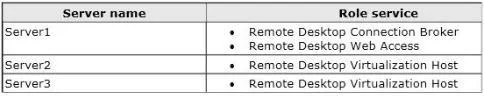
Your network contains an Active Directory domain named contoso.com. The domain contains a Virtual Desktop Infrastructure (VDI). The VDI contains three servers. The servers are configured as shown in…
Sign in or unlock 70-415 to reveal the answer and full explanation for question #17. The question stem and answer options stay visible for context.
Manage and maintain a Microsoft deployment
Question
Your network contains an Active Directory domain named contoso.com. The domain contains a Virtual Desktop Infrastructure (VDI). The VDI contains three servers. The servers are configured as shown in the following table. You need to identify the last 30 users who attempted to connect to a virtual desktop. What should you do?
Exhibit
Options
- AOn Server1, create a Data Collector Set (DCS) by using Performance Monitor.
- BOn Server1, run rdvdiag.exe.
- COn Server2 and Server3, run rdvdiag.exe.
- DOn Server2 and Server3, create a Data Collector Set (DCS) by using Performance Monitor.
Unlock 70-415 to see the answer
You've previewed enough free 70-415 questions. Unlock 70-415 for full answers, explanations, the timed quiz mode, progress tracking, and the master PDF. Question stem and options stay visible so you can still see what's on the exam.
Topics
#VDI diagnostics#rdvdiag.exe#RD Connection Broker#connection tracking