
70-339 · Question #63
Your organization has a complex retention schedule that clearly defines retention policies for all document types. Each department has its own SharePoint site. In many cases, a single document…
The correct answer is D. Configure information management policies on content types. When a single library contains multiple document types each with different retention requirements, policies must be applied at the content type level so each document type can be managed from one place regardless of which library it resides in.
Question
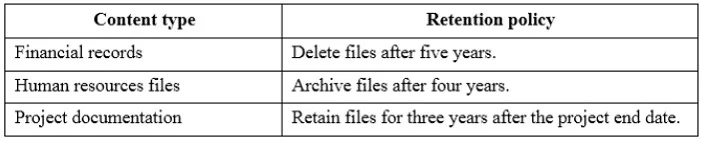
Your organization has a complex retention schedule that clearly defines retention policies for all document types. Each department has its own SharePoint site. In many cases, a single document library on a department site may contain financial files, human resources files, and project documentation. The following table lists the retention policies that are in place. You must administer retention rules from a single location for each type of document and must leverage out of the box functionality. You need to configure the SharePoint environment to comply with the retention schedule. What should you do?
Exhibit
Options
- AConfigure information management policies for the document libraries.
- BActivate the Disposition Approval feature.
- CActivate the In-Place Records Management feature.
- DConfigure information management policies on content types.
- EActivate library and folder-based retention.
How the community answered
(50 responses)- A6% (3)
- B18% (9)
- C2% (1)
- D64% (32)
- E10% (5)
Why each option
When a single library contains multiple document types each with different retention requirements, policies must be applied at the content type level so each document type can be managed from one place regardless of which library it resides in.
Configuring policies on document libraries requires visiting and configuring each library individually, so there is no single location of management per document type when libraries span multiple department sites.
The Disposition Approval feature enables a workflow step for reviewing items before final deletion, but it does not itself define or centralize retention schedule rules.
In-Place Records Management activates the ability to declare records within a library, but it does not address managing different retention rules per document type from a single location.
Content types are reusable definitions that can be applied across multiple libraries and sites. By attaching an information management policy (including retention schedules) directly to each content type, the retention rule follows the content type everywhere it is used, allowing centralized management per document type without touching individual libraries.
Library and folder-based retention scopes policies to specific containers, requiring configuration in every affected library or folder rather than managing each document type from one central definition.
Concept tested: SharePoint content type information management policies for retention
Source: https://learn.microsoft.com/en-us/sharepoint/governance/information-management-policy-planning
Topics
Community Discussion
No community discussion yet for this question.