
70-246 · Question #5
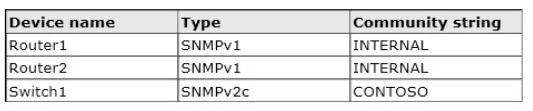
Your company has a private cloud that is managed by using a System Center 2012 Operations Manager infrastructure. The network contains three devices. The devices are configured as shown in the…
The correct answer is B. From the Operations Manager console, create two Run As Accounts. Each SNMPv3 device would need its own run as account. As there are no SNMPv3 devices in the list only v1/v2 we need just one run as account per different community string. As there are two diffrent community strings used for the 3 devices we need two run as accounts.
Question
Your company has a private cloud that is managed by using a System Center 2012 Operations Manager infrastructure. The network contains three devices. The devices are configured as shown in the following table. You need to ensure that Operations Manager can discover all of the devices. What should you do?
Exhibit
Options
- AFrom the Operations Manager console, create one group and set the group to Dynamic
- BFrom the Operations Manager console, create two Run As Accounts.
- CFrom the Operations Manager Shell, run the Set-SCOMUserRole cmdlet.
- DFrom the Operations Manager Shell, run the Enable-SCOMDiscovery cmdlet.
How the community answered
(16 responses)- A13% (2)
- B75% (12)
- C6% (1)
- D6% (1)
Explanation
Each SNMPv3 device would need its own run as account. As there are no SNMPv3 devices in the list only v1/v2 we need just one run as account per different community string. As there are two diffrent community strings used for the 3 devices we need two run as accounts.
Topics
Community Discussion
No community discussion yet for this question.