
70-246 · Question #165
Your network contains an Active Directory domain named contoso.com. The domain contains a domain controller named DC1 and a server named Server1. You install the management server role on Server1…
The correct answer is D. On DC1, install OomADs.msi. You can use MOMAgent.msi to deploy System Center 2012 - Operations Manager agents from the Deploying agents from the command line is also referred to as a manual install When installing the AD Management pack, please remember to open up the properties for the Agent which the DC…
Question
Your network contains an Active Directory domain named contoso.com. The domain contains a domain controller named DC1 and a server named Server1. You install the management server role on Server1. You install the Operations Manager agent on DC1. You run the Operations Manager console and discover the active alerts shown in the exhibit. (Click the Exhibit button.) You need to resolve the active alerts. What should you do?
Exhibit
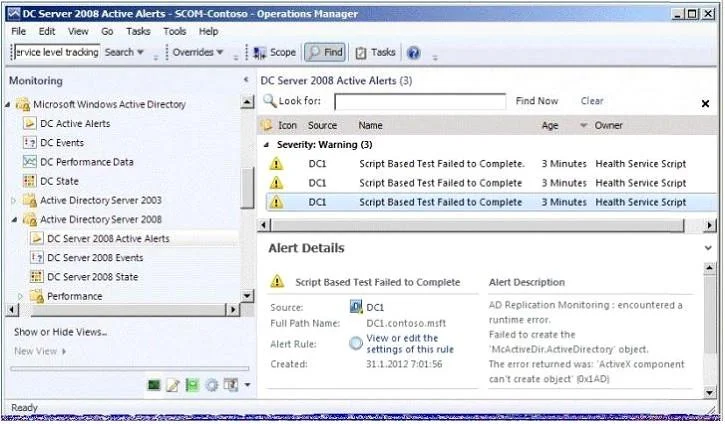
Options
- AOn DC1, install MOMADAdmin.exe.
- BOn Server1, install OomADs.msi.
- COn Server1, install MOMADAdmin.exe.
- DOn DC1, install OomADs.msi.
How the community answered
(35 responses)- A14% (5)
- B3% (1)
- C6% (2)
- D77% (27)
Explanation
You can use MOMAgent.msi to deploy System Center 2012 - Operations Manager agents from the Deploying agents from the command line is also referred to as a manual install When installing the AD Management pack, please remember to open up the properties for the Agent which the DC is installed and check "Allow this agent to act as a proxy and discover managed objects on other computers." ALSO, please install the "OOMADs.msi" locally on the DC. This is the Active Directory Management Helper Object. It's not well mentioned in documentation I have read up on. Apparently the "AD Database and Log: The script ‘AD Database and Log’ failed to create object ‘McActiveDir.ActiveDirectory’. The error returned was: ‘ActiveX component can’t create object’ (0x1AD)" error is a result of not having this component installed "The file which is installed automatically on a push install via a Management Server can be copied and manually installed from the OpsMgr software -- there is a HelpObjects folder where ooMADS.msi can be run from."
Topics
Community Discussion
No community discussion yet for this question.