
Microsoft
70-243 · Question #80
Your network contains a System Center 2012 Configuration Manager environment. You are creating a configuration item that contains application settings for Microsoft Office 2010. You need to detect…
The correct answer is B. Enable Use Windows Installer detection. Here are the basic steps for adding a Windows Installer detection method: 1. From the Deployment Type Properties dialog, select the Detection Method tab, and click 2. Choose the appropriate setting type. In this case, select Windows Installer, and click the 3. Navigate to the…
Implementing Compliance Settings and Endpoint Protection
Question
Your network contains a System Center 2012 Configuration Manager environment. You are creating a configuration item that contains application settings for Microsoft Office 2010. You need to detect whether Office 2010 is installed before validating the configuration item. What should you do?
Exhibit
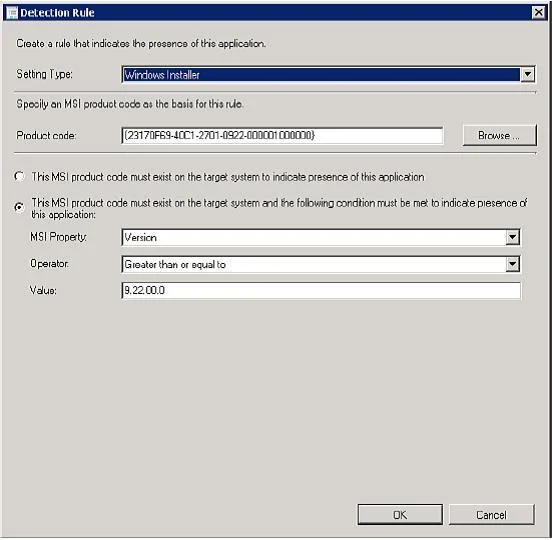
Options
- ASet Software Inventory to True
- BEnable Use Windows Installer detection.
- CCreate an automatic deployment rule.
- DCreate a direct membership collection
How the community answered
(55 responses)- A4% (2)
- B95% (52)
- C2% (1)
Explanation
- Here are the basic steps for adding a Windows Installer detection method: 1. From the Deployment Type Properties dialog, select the Detection Method tab, and click 2. Choose the appropriate setting type. In this case, select Windows Installer, and click the 3. Navigate to the desired .msi file and select Open. The product code appears, as By default, the rule looks for only the product code. 4. Click OK to save the detection rule.
Topics
#configuration item#Windows Installer detection#Office 2010#compliance settings
Community Discussion
No community discussion yet for this question.