
70-158 · Question #83
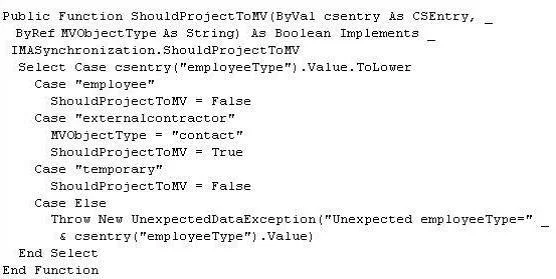
You use Forefront Identity Manager (FIM) 2010 in your company network. The following projection rule is used to map disconnector objects. You need to ensure that employees and contractors matching…
The correct answer is A. Add MVObjectType = "person" to the employee case. C. Append the search string for "contractor" to the employee case. E. Set ShouldProjectToMV = True for the employee case. This question tests FIM 2010 projection rules for connecting connector space objects to the metaverse with correct object types. You must configure the employee case to project as 'person' objects and include contractor matching, while leaving external contractors to project as…
Question
Exhibit
Options
- AAdd MVObjectType = "person" to the employee case.
- BAppend the search string for "contractor" to the externalcontractor case.
- CAppend the search string for "contractor" to the employee case.
- DSet ShouldProjectToMV = False for the externalcontractor case.
- ESet ShouldProjectToMV = True for the employee case.
- FChange csentry("employeeType") to csentry("person").
How the community answered
(58 responses)- A66% (38)
- B19% (11)
- D10% (6)
- F5% (3)
Why each option
This question tests FIM 2010 projection rules for connecting connector space objects to the metaverse with correct object types. You must configure the employee case to project as 'person' objects and include contractor matching, while leaving external contractors to project as 'contact' objects.
Setting MVObjectType = 'person' in the employee case explicitly defines that when the projection rule fires for employees (and contractors matched in that case), the resulting metaverse object will be of type 'person', which is required to satisfy the stated requirement.
Appending the contractor search string to the externalcontractor case would cause contractors to be projected as 'contact' objects, which contradicts the requirement that (internal) contractors matching the attribute must be connected as 'person' objects.
Appending the search string for 'contractor' to the employee case ensures that contractors who should be treated as person objects (internal contractors) are matched by the same case rule that projects to the 'person' MVObjectType, connecting them correctly to the metaverse as persons.
Setting ShouldProjectToMV = False for the externalcontractor case would prevent external contractors from being projected into the metaverse at all, but the requirement states they must be connected as 'contact' objects, so projection must remain enabled (True) for that case.
Setting ShouldProjectToMV = True for the employee case activates the projection logic for that case, meaning matched objects (employees and contractors) will actually be projected into the metaverse rather than remaining as disconnectors.
csentry('employeeType') references the correct connector space attribute used to evaluate the employee type value; changing it to csentry('person') would reference a non-existent or incorrect attribute, breaking the projection rule logic entirely.
Concept tested: FIM 2010 projection rules and metaverse object type mapping
Source: https://learn.microsoft.com/en-us/previous-versions/windows/desktop/forefront-2010/ms698900(v=vs.100)
Topics
Community Discussion
No community discussion yet for this question.