
70-158 · Question #15
Drag and Drop Question Your install Forefront Identity Manager (FIM) 2010 in your company network. You creat a new object named ClassificationType. You need to ensure that the is available for…
The correct answer is From the FIM Portal navigation bar, create a new Security Group that matches the resource type of Computer.; From FIM Portal configuration, set the Search Scope Order setting to 1.; From FIM Portal configuration, set the Search Scope Order setting to 99.; Run Iisreset.exe. To make a newly created object type (ClassificationType) available for synchronization with Management Agents in FIM 2010, you must first clear the FIM Portal's configuration cache by setting the Global Cache Duration to 0, then run IISReset.exe to force the portal to reload…
Question
Exhibit
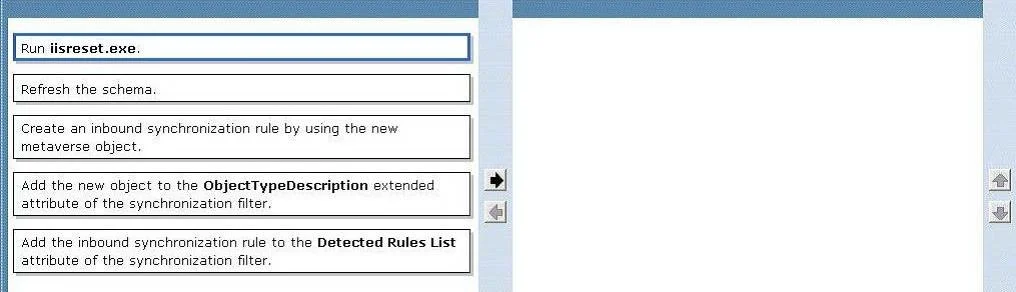
Answer Area
Drag items
Correct arrangement
- From the FIM Portal navigation bar, create a new Security Group that matches the resource type of Computer.
- From FIM Portal configuration, set the Search Scope Order setting to 1.
- From FIM Portal configuration, set the Search Scope Order setting to 99.
- Run Iisreset.exe.
Explanation
To make a newly created object type (ClassificationType) available for synchronization with Management Agents in FIM 2010, you must first clear the FIM Portal's configuration cache by setting the Global Cache Duration to 0, then run IISReset.exe to force the portal to reload and recognize the new schema object. This two-step process ensures the FIM Service picks up the new resource type and makes it available for Management Agent synchronization rules and attribute flows.
Topics
Community Discussion
No community discussion yet for this question.