
70-158 · Question #12
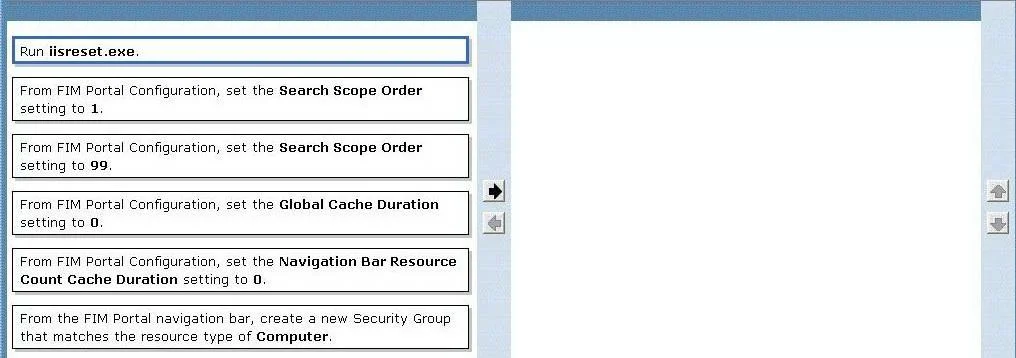
Drag and Drop Question Your company network contanis Forefront Identity Manager (FIM) 2010. You need to create a new search srope for All computers in the FIM Portal Administrator. You also need to…
The correct answer is From the FIM Portal navigation bar, create a new Security Group that matches the resource type of Computer.; From FIM Portal Configuration, set the Search Scope Order setting to 1.; Run Ibresot.exe. To create a search scope for 'All Computers' that appears at the top of the list, you must first create a new Security Group in the FIM Portal navigation bar that matches the resource type of Computer (which defines the search scope), and then set the Search Scope Order to 1 in…
Question
Exhibit
Answer Area
Drag items
Correct arrangement
- From the FIM Portal navigation bar, create a new Security Group that matches the resource type of Computer.
- From FIM Portal Configuration, set the Search Scope Order setting to 1.
- Run Ibresot.exe.
Explanation
To create a search scope for 'All Computers' that appears at the top of the list, you must first create a new Security Group in the FIM Portal navigation bar that matches the resource type of Computer (which defines the search scope), and then set the Search Scope Order to 1 in FIM Portal Configuration. Setting the order to 1 ensures the search scope appears at the top of the list, as lower numbers have higher priority in the ordering sequence.
Topics
Community Discussion
No community discussion yet for this question.