nerdexam
Broadcom-VMware

5V0-22.23 · Question #91

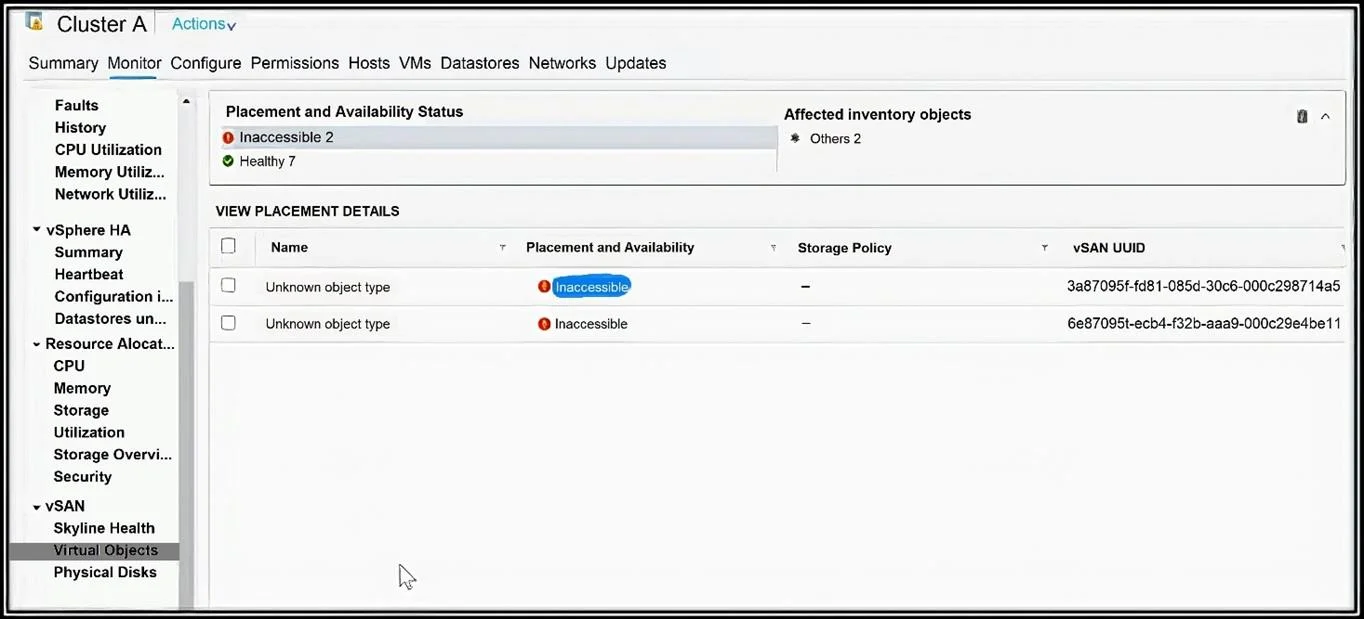
Refer to the exhibit. A vSAN administrator was examining the status of Virtual Objects and found inaccessible objects that are occupying significant storage capacity. Which action is needed to…

The correct answer is C. Identify and remove the obsolete object. Inaccessible objects that occupy storage but are no longer tied to any active VM workload are considered obsolete. vSAN does not automatically clean these up, so an administrator must manually identify and delete them to reclaim the consumed capacity - making C the correct…

Troubleshooting and Repairing VMware vSAN

Question

Refer to the exhibit. A vSAN administrator was examining the status of Virtual Objects and found inaccessible objects that are occupying significant storage capacity. Which action is needed to restore the storage capacity?

Exhibits

5V0-22.23 question #91 exhibit 1
5V0-22.23 question #91 exhibit 2

Options

  • ATrigger a manual resync, and allow vSAN to heal the object
  • BRestart the host, and obsolete objects will be removed on their own
  • CIdentify and remove the obsolete object
  • DEvacuate data on affected node by using the Full Data Migration mode

How the community answered

(41 responses)
  • A
    22% (9)
  • B
    10% (4)
  • C
    63% (26)
  • D
    5% (2)

Explanation

Inaccessible objects that occupy storage but are no longer tied to any active VM workload are considered obsolete. vSAN does not automatically clean these up, so an administrator must manually identify and delete them to reclaim the consumed capacity - making C the correct action.

Why the distractors are wrong:

  • A is wrong because a manual resync is used to repair objects with policy compliance issues (e.g., reduced redundancy), not to reclaim space from truly obsolete/orphaned objects.
  • B is wrong because restarting the host does not trigger cleanup of orphaned objects; vSAN has no automatic garbage collection that fires on a host reboot.
  • D is wrong because Full Data Migration evacuates live data off a host for maintenance purposes - it does nothing to remove or recover space from already-inaccessible objects.

Memory tip: Think "inaccessible = orphan = manual cleanup." vSAN is conservative - it won't delete data on its own, so whenever you see inaccessible objects consuming space, the answer always involves an admin taking deliberate action to remove them, not waiting for automation to fix it.

Topics

#vSAN object management#storage capacity restoration#obsolete objects#administrative remediation

Community Discussion

No community discussion yet for this question.

Full 5V0-22.23 Practice