
5V0-22.21 · Question #87
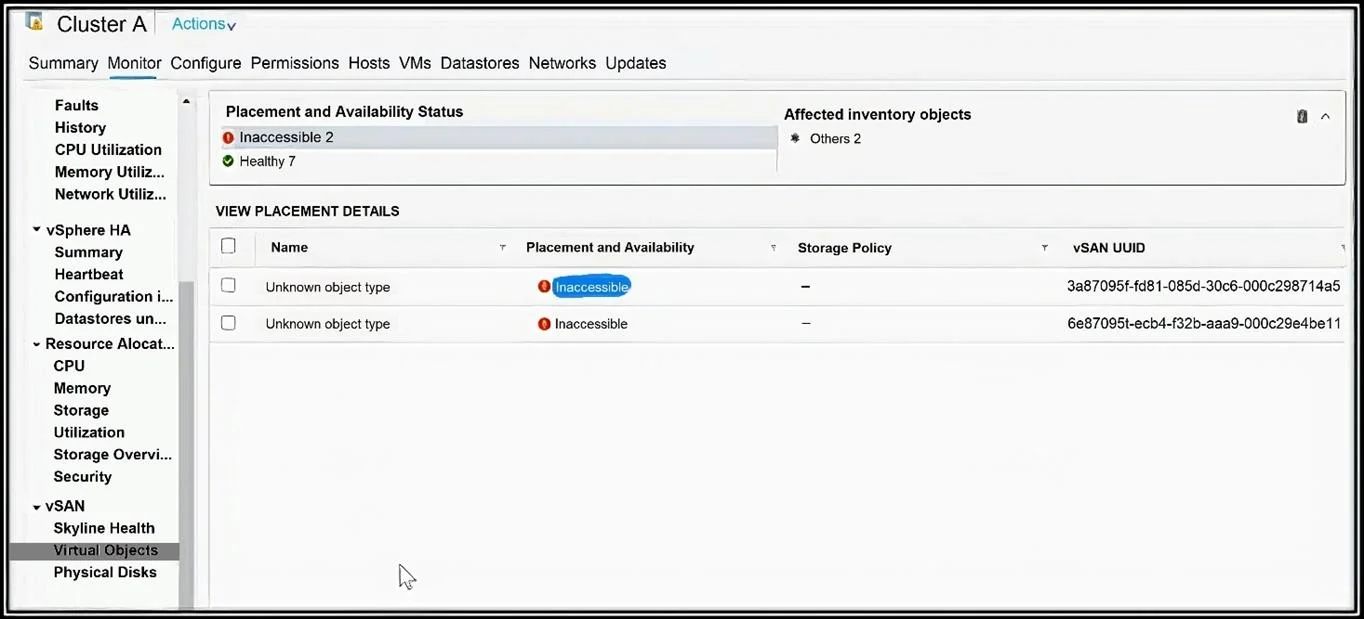
A vSAN administrator was examining the status of Virtual Objects and found inaccessible objects that are occupying significant storage capacity. Refer to the exhibit. Which action is needed to…
The correct answer is B. Identity and remove the obsolete object. Inaccessible objects have to be manually removed. Resync will not work since the object is already in inaccessible state. The question talks about clearing storage space so it has to be to remove those objects.
Question
A vSAN administrator was examining the status of Virtual Objects and found inaccessible objects that are occupying significant storage capacity. Refer to the exhibit. Which action is needed to restore the storage capacity?
Exhibit
Options
- AEvacuate data on affected node by using the Full Data Migration mode.
- BIdentity and remove the obsolete object.
- CRestart the host, and obsolete objects will be removed on their own.
- DTrigger a manual resync, and allow vSAN to heal the object.
How the community answered
(36 responses)- A3% (1)
- B78% (28)
- C6% (2)
- D14% (5)
Explanation
Inaccessible objects have to be manually removed. Resync will not work since the object is already in inaccessible state. The question talks about clearing storage space so it has to be to remove those objects.
Topics
Community Discussion
No community discussion yet for this question.