
500-420 · Question #28
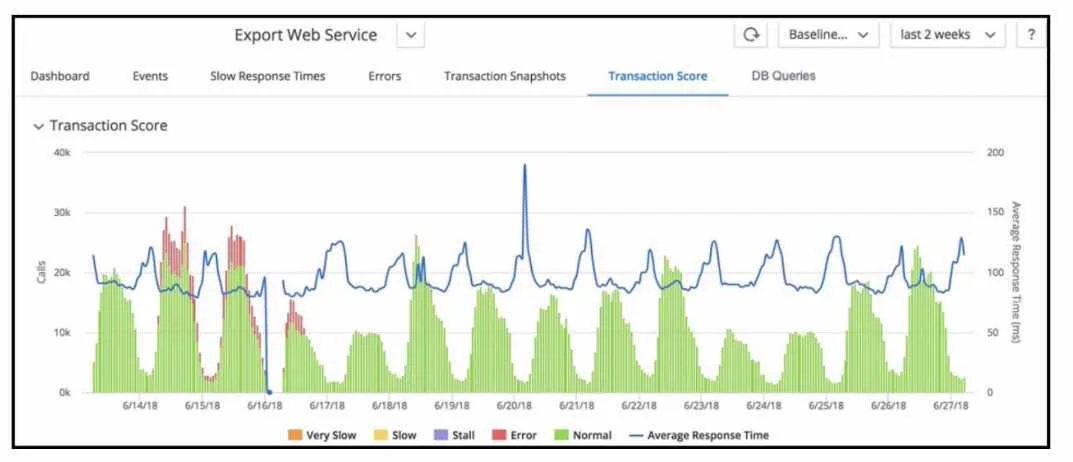
Refer to the exhibit. When looking at the Transaction Score for a specific transaction, how are errors in the transaction identified?
The correct answer is A. Set the time range and drill down into the snapshots in the Error tab. Errors in a transaction are identified by examining the snapshots that capture the problematic transactions. By setting the appropriate time range, a Performance Analyst can drill down into the snapshots within the Error tab to identify and analyze errors. These snapshots…
Question
Refer to the exhibit. When looking at the Transaction Score for a specific transaction, how are errors in the transaction identified?
Exhibit
Options
- ASet the time range and drill down into the snapshots in the Error tab.
- BSet the time range and examine the Slow Response Times tab.
- CSet the time range and examine the dashboard for errors.
- DSet the time range and drill down into the snapshots in the Events tab.
How the community answered
(45 responses)- A93% (42)
- C4% (2)
- D2% (1)
Explanation
Errors in a transaction are identified by examining the snapshots that capture the problematic transactions. By setting the appropriate time range, a Performance Analyst can drill down into the snapshots within the Error tab to identify and analyze errors. These snapshots provide detailed diagnostic information, such as stack traces, slow SQL queries, and error logs, which are vital for pinpointing the root cause of transaction errors.
Topics
Community Discussion
No community discussion yet for this question.