
350-901 · Question #76
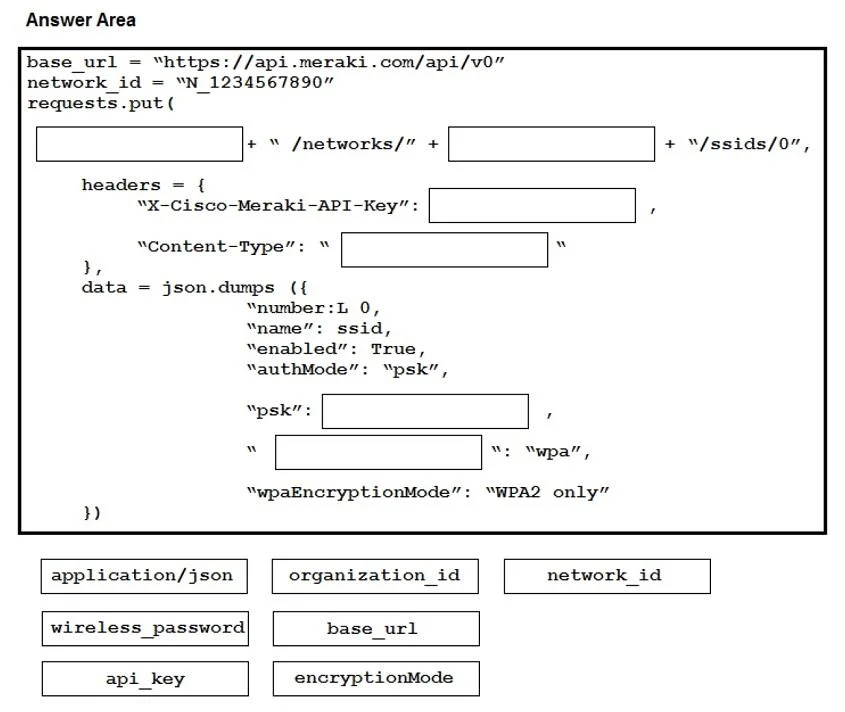
The Meraki API URL https://api.meraki.com/api/v0/networks/123456789/ssids/2 is been stored in the environment variable meraki_url and the API key has been stored in meraki_api_key. Which snippet…
The correct answer is B. curl -X PUT \ -url 'https://api.meraki.com/api/v0/networks/networkId/ssids/2' \ -H 'X-Cisco-Meraki-API-Key: 15da0c6fff295f16267f88f98694cf29a86ed87' \ -H 'Accept: application/json' \ -H 'Content-Type: application/json' \ --data-raw '{ "name": "My SSID", "enabled": true, "authMode": "psk", "encryptionMode": "wpa", "psk": "meraki123", "wpaEncryptionMode": "WPA1 and WPA2" }'. To configure, secure, and enable an SSID via the Meraki API, a PUT request is used with a JSON payload that includes enabled: true and all required security parameters.
Question
Exhibit
Options
- Acurl -X PUT
-url 'https://api.meraki.com/api/v0/networks/networkId/ssids/2'
-H 'X-Cisco-Meraki-API-Key: 15da0c6fff295f16267f88f98694cf29a86ed87'
-H 'Accept: application/json'
-H 'Content-Type: application/json'
--data-raw '{ "name": "My SSID", "enabled": false, "authMode": "psk", "encryptionMode": "wpa", "psk": "meraki123", "wpaEncryptionMode": "WPA1 and WPA2" }' - Bcurl -X PUT
-url 'https://api.meraki.com/api/v0/networks/networkId/ssids/2'
-H 'X-Cisco-Meraki-API-Key: 15da0c6fff295f16267f88f98694cf29a86ed87'
-H 'Accept: application/json'
-H 'Content-Type: application/json'
--data-raw '{ "name": "My SSID", "enabled": true, "authMode": "psk", "encryptionMode": "wpa", "psk": "meraki123", "wpaEncryptionMode": "WPA1 and WPA2" }' - Ccurl -X PUT
-url 'https://api.meraki.com/api/v0/networks/networkId/ssids/2'
-H 'X-Cisco-Meraki-API-Key: 15da0c6fff295f16267f88f98694cf29a86ed87'
-H 'Accept: application/json'
-H 'Content-Type: application/json'
--data-raw '{ "enabled": true, "useVlanTagging": true }' - Dcurl -X PUT
-url 'https://api.meraki.com/api/v0/networks/networkId/ssids/2'
-H 'X-Cisco-Meraki-API-Key: 15da0c6fff295f16267f88f98694cf29a86ed87'
-H 'Accept: application/json'
-H 'Content-Type: application/json'
--data-raw '{ "name": "My SSID", "enabled": true, }'
How the community answered
(21 responses)- B86% (18)
- C5% (1)
- D10% (2)
Why each option
To configure, secure, and enable an SSID via the Meraki API, a PUT request is used with a JSON payload that includes `enabled: true` and all required security parameters.
This snippet sets `enabled` to `false`, which would disable the SSID, contradicting the requirement to enable it.
This snippet correctly uses the PUT method to update the SSID configuration, sets `enabled` to `true` to enable it, and includes all the necessary parameters (`name`, `authMode`, `encryptionMode`, `psk`, `wpaEncryptionMode`) to secure the SSID.
This snippet only enables the SSID and sets VLAN tagging, but it does not include the necessary parameters for securing the SSID (authMode, encryptionMode, psk).
This snippet enables the SSID but omits crucial security configuration parameters, failing to secure it as required.
Concept tested: Meraki API SSID configuration and HTTP PUT method
Source: https://developer.cisco.com/meraki/api-v1/#!update-network-ssid
Topics
Community Discussion
No community discussion yet for this question.