
350-801 · Question #381
Refer to the exhibit. An engineer configured NTP on Cisco UCM and runs the utils ntp status command from Cisco UCM CLI and receives an error message. How is this issue mitigated and fixed?
The correct answer is D. Ensure that Cisco UCM can communicate with the NTP server on port 123 and have a Linux NTP. To mitigate and fix an NTP synchronization issue on Cisco UCM, it is crucial to ensure that Cisco UCM can communicate with the NTP server on its standard UDP port 123.
Question
Refer to the exhibit. An engineer configured NTP on Cisco UCM and runs the utils ntp status command from Cisco UCM CLI and receives an error message. How is this issue mitigated and fixed?
Exhibit
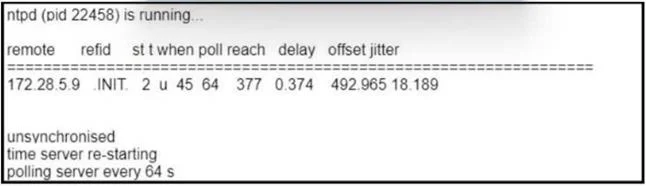
Options
- AUse an external NTP server and allow communication on port 53.
- BEnsure that Cisco UCM can communicate with the NTP server on port 53 and have a Windows
- CConfigure the NTP server to answer requests on port 443.
- DEnsure that Cisco UCM can communicate with the NTP server on port 123 and have a Linux NTP
How the community answered
(21 responses)- A10% (2)
- B5% (1)
- C14% (3)
- D71% (15)
Why each option
To mitigate and fix an NTP synchronization issue on Cisco UCM, it is crucial to ensure that Cisco UCM can communicate with the NTP server on its standard UDP port 123.
Port 53 is used for DNS (Domain Name System) services, not NTP. NTP exclusively uses UDP port 123 for time synchronization.
Port 53 is for DNS, not NTP. Communication for NTP occurs over UDP port 123.
Port 443 is used for HTTPS (secure web traffic), not NTP. Configuring an NTP server to listen on port 443 would prevent Cisco UCM from synchronizing time correctly.
Concept tested: NTP protocol and port number
Source: https://www.cisco.com/c/en/us/td/docs/voice_ip_comm/cucm/install/12_5_1/cucm_b_install-guide-1251/cucm_b_install-guide-1251_chapter_0100.html
Topics
Community Discussion
No community discussion yet for this question.