
350-801 · Question #114
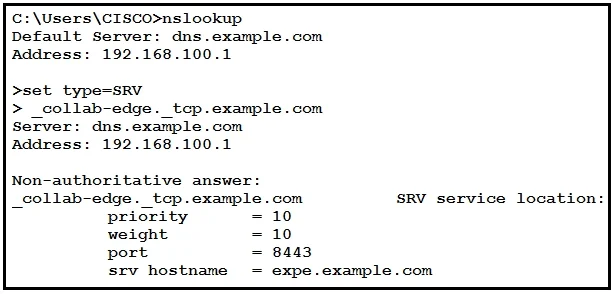
Refer to the exhibit. You deploy Mobile and Remote Access for Jabber and discover that Jabber for Windows does not register to cisco Unified Communications Manager while outside of the office. What…
The correct answer is B. The DNS record should be changed from _collab-edge._tcp.example.com to __collab-edge. For Cisco Mobile and Remote Access (MRA), Jabber clients outside the corporate network use a DNS SRV lookup to discover Cisco Expressway-E. The correct DNS SRV record must use '_tls' (Transport Layer Security) as the transport protocol, not '_tcp'. The proper format is…
Question
Refer to the exhibit. You deploy Mobile and Remote Access for Jabber and discover that Jabber for Windows does not register to cisco Unified Communications Manager while outside of the office. What is a cause of this issue?
Exhibit
Options
- AThe DNS record should be created for _ cisco-uds _tcp example.com.
- BThe DNS record should be changed from _collab-edge._tcp.example.com to __collab-edge
- CThe DNS record type should be changed from SRV to A.
- DServer 4.2.2.2 is not a valid DNS server.
How the community answered
(19 responses)- A5% (1)
- B68% (13)
- C11% (2)
- D16% (3)
Explanation
For Cisco Mobile and Remote Access (MRA), Jabber clients outside the corporate network use a DNS SRV lookup to discover Cisco Expressway-E. The correct DNS SRV record must use '_tls' (Transport Layer Security) as the transport protocol, not '_tcp'. The proper format is: _collab-edge._tls.example.com. Jabber specifically queries for this _tls SRV record when initiating MRA. If the record is configured with '_tcp' instead of '_tls', Jabber will fail to discover the Expressway-E server and will be unable to register to CUCM remotely. The exhibit likely shows _collab-edge._tcp.example.com, which is incorrect and must be corrected to _collab-edge._tls.example.com.
Topics
Community Discussion
No community discussion yet for this question.