
350-701 · Question #810
Drag and Drop Question An engineer must modify the Global Access Policy on a Cisco Secure Web Appliance. Blocked URLs must now be set to Monitor instead of Block. Drag and drop the steps from the…
The correct answer is Click Web Security Manager, and then click Access Policies.; Click Global Policy, and then click URL Filtering.; Select the custom categories.; Click the Blocked URLs drop-down menu, choose Include in policy, and then click Apply.; Place a checkmark in the box for Monitor > Submit > Commit. The correct sequence follows the logical navigation path within Cisco Secure Web Appliance: first navigate to Web Security Manager > Access Policies to reach the policy management area, then select the Global Policy and URL Filtering to access the specific filtering settings…
Question
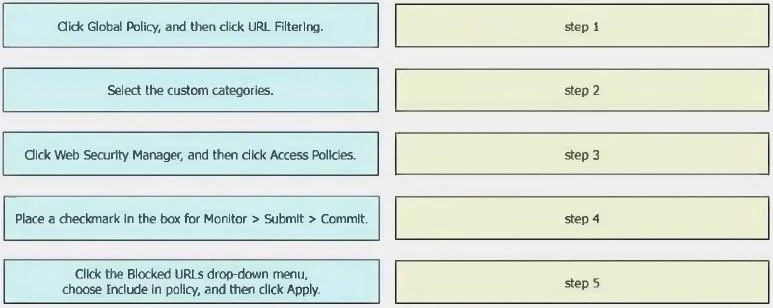
Drag and Drop Question An engineer must modify the Global Access Policy on a Cisco Secure Web Appliance. Blocked URLs must now be set to Monitor instead of Block. Drag and drop the steps from the left into the sequence on the right to complete the configuration. Answer:
Exhibit
Answer Area
Drag items
Correct arrangement
- Click Web Security Manager, and then click Access Policies.
- Click Global Policy, and then click URL Filtering.
- Select the custom categories.
- Click the Blocked URLs drop-down menu, choose Include in policy, and then click Apply.
- Place a checkmark in the box for Monitor > Submit > Commit.
Explanation
The correct sequence follows the logical navigation path within Cisco Secure Web Appliance: first navigate to Web Security Manager > Access Policies to reach the policy management area, then select the Global Policy and URL Filtering to access the specific filtering settings, then select custom categories, use the Blocked URLs drop-down to include them in policy, and finally apply and commit the changes. This order reflects the hierarchical menu navigation required by the appliance's GUI, where you must reach the correct policy container before you can modify URL category actions and save changes.
Topics
Community Discussion
No community discussion yet for this question.