
350-701 · Question #799
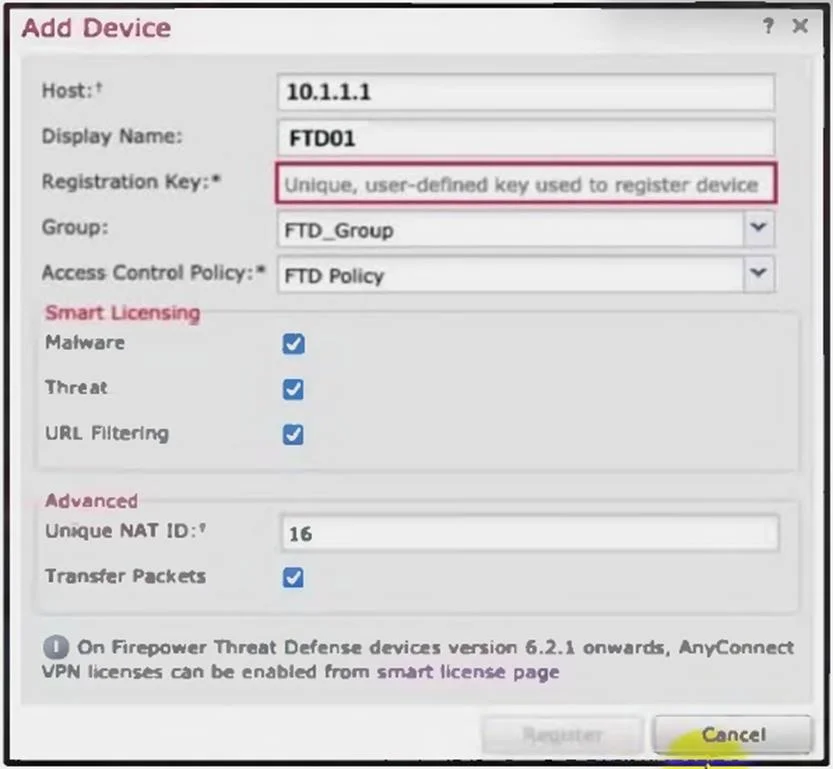
Refer to the exhibit. An administrator is adding a new Cisco Secure Firewall Threat Defence with IP address 10.1.1.100 managed with Cisco Secure Firewall Management Center. The registration key of…
The correct answer is C. configure manager add 10.1.1.100 <registration key>. The correct syntax for registering a Cisco Secure Firewall Threat Defense (FTD) device with the Cisco Secure Firewall Management Center (FMC) involves using the configure manager add command followed by the FMC IP address and the registration key. Since the FTD is managed by…
Question
Refer to the exhibit. An administrator is adding a new Cisco Secure Firewall Threat Defence with IP address 10.1.1.100 managed with Cisco Secure Firewall Management Center. The registration key of Cisc0489560849 will be used for integration. Which command must be configured on Cisco Secure Firewall Threat Defence?
Exhibit
Options
- Aconfigure manager add <registration key> 10.1.1.100 10
- Bconfigure manager add DONTRESOLVE <registration key> FTD01
- Cconfigure manager add 10.1.1.100 <registration key>
- Dconfigure manager add DONTRESOLVE <registration key>
How the community answered
(51 responses)- A4% (2)
- B10% (5)
- C71% (36)
- D16% (8)
Explanation
The correct syntax for registering a Cisco Secure Firewall Threat Defense (FTD) device with the Cisco Secure Firewall Management Center (FMC) involves using the configure manager add command followed by the FMC IP address and the registration key. Since the FTD is managed by FMC at IP address 10.1.1.100, the correct command is configure manager add 10.1.1.100 Cisc0489560849 10.1.1.100 is the IP address of the FMC. Cisc0489560849 is the registration key specified for integration.
Topics
Community Discussion
No community discussion yet for this question.