
350-701 · Question #777
Drag and Drop Question An engineer must enable Outbreak Filters globally on an AsyncOS for Cisco Secure Email Gateway to protect the network from large-scale malware attacks. Drag and drop the steps…
The correct answer is Click Security Services, and then click Outbreak Filters.; Click Edit Global Settings.; Enable Outbreak Filters globally.; Submit and commit your changes. The correct sequence follows the logical navigation and configuration workflow in AsyncOS: first navigate to the Outbreak Filters section via Security Services, then access the global settings editor, enable the feature, and finally save and apply changes. This order is…
Question
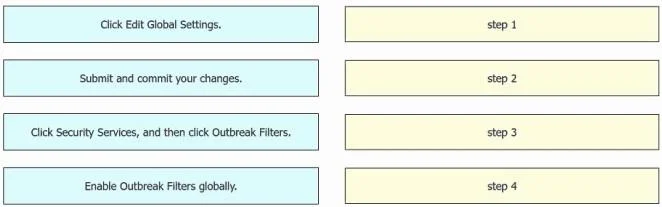
Drag and Drop Question An engineer must enable Outbreak Filters globally on an AsyncOS for Cisco Secure Email Gateway to protect the network from large-scale malware attacks. Drag and drop the steps from the left into the sequence on the right to complete the configuration. Answer:
Exhibit
Answer Area
Drag items
Correct arrangement
- Click Security Services, and then click Outbreak Filters.
- Click Edit Global Settings.
- Enable Outbreak Filters globally.
- Submit and commit your changes.
Explanation
The correct sequence follows the logical navigation and configuration workflow in AsyncOS: first navigate to the Outbreak Filters section via Security Services, then access the global settings editor, enable the feature, and finally save and apply changes. This order is mandatory because you must reach the correct menu location before you can edit settings, and committing changes is always the final step in AsyncOS to make configurations take effect.
Topics
Community Discussion
No community discussion yet for this question.