
350-701 · Question #753
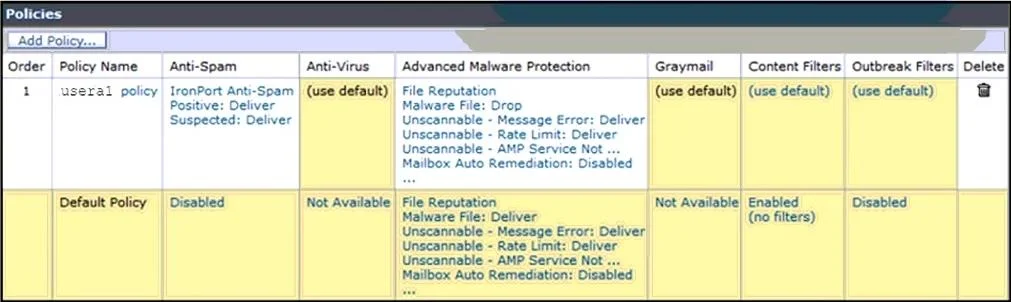
Refer to the exhibit. A company named ABC has a Cisco Secure Email Gateway and an engineer must configure the incoming mail policy so that emails containing malware files are quarantined instead of…
The correct answer is D. Open usera1 policy, Messages with Malware Attachments, and then Action Applied to Message. Option D is correct because the exhibit shows a usera1 policy that has a separate configuration from the default policy - to change how malware attachments are handled for that specific policy scope, you must open the usera1 policy, navigate to Messages with Malware…
Question
Refer to the exhibit. A company named ABC has a Cisco Secure Email Gateway and an engineer must configure the incoming mail policy so that emails containing malware files are quarantined instead of dropped and to prevent an increase in false positives causing emails to be dropped erroneously. What must be configured on the Secure Email Gateway?
Exhibit
Options
- AChange the Policies Order.
- BOpen Default Policy, Malware File, and then Action Applied to Message.
- CDelete usera1 policy.
- DOpen usera1 policy, Messages with Malware Attachments, and then Action Applied to Message.
How the community answered
(29 responses)- A14% (4)
- B3% (1)
- C3% (1)
- D79% (23)
Explanation
Option D is correct because the exhibit shows a usera1 policy that has a separate configuration from the default policy - to change how malware attachments are handled for that specific policy scope, you must open the usera1 policy, navigate to Messages with Malware Attachments, and modify the Action Applied to Message from "drop" to "quarantine." This targets only the relevant policy without touching the default, directly addressing both requirements (quarantine instead of drop, and avoiding unintended false-positive drops elsewhere).
Why the distractors are wrong:
- A - Reordering policies changes which policy applies to which sender/recipient, but does not change the malware action itself.
- B - Modifying the Default Policy affects all traffic not covered by a specific policy; since usera1 already exists and overrides defaults for its scope, changing the default won't fix the usera1 behavior and risks broader side effects.
- C - Deleting usera1 would fall back to default policy behavior, which doesn't guarantee quarantine and could introduce the very false-positive drops the engineer is trying to prevent.
Memory tip: In Cisco Secure Email Gateway, always match the scope of the problem to the scope of the fix - if the issue is with a named user policy (usera1), drill into that policy's action settings, not the default. Think: "named policy → attachment type → action."
Topics
Community Discussion
No community discussion yet for this question.