
350-701 · Question #687
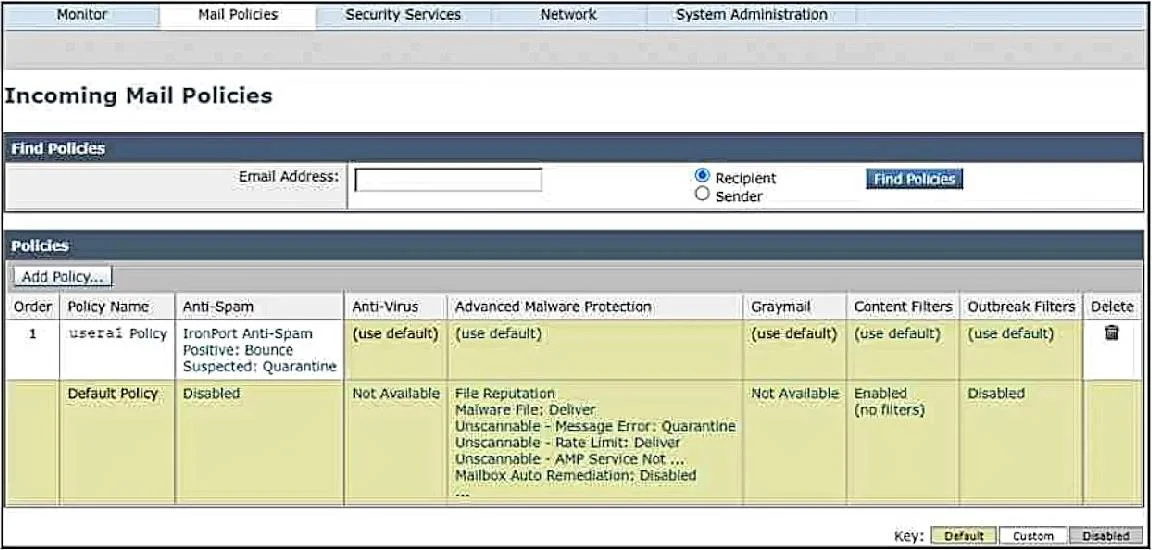
Refer to the exhibit. An engineer created a policy named usera1 on a Cisco Secure Email Gateway to enable the antispam feature for an email address of [email protected]. Which configuration step must…
The correct answer is B. Click the Policy Name usera1 Policy, and then click Add User. To apply a specific mail policy to a particular email address on a Cisco Secure Email Gateway, the user must be added directly to the policy's user list.
Question
Refer to the exhibit. An engineer created a policy named usera1 on a Cisco Secure Email Gateway to enable the antispam feature for an email address of [email protected]. Which configuration step must be performed next to apply the policy only to the [email protected] email address?
Exhibit
Options
- ASpecify the user in Mail Policies > Mail Policies Settings
- BClick the Policy Name usera1 Policy, and then click Add User.
- CSet the user in Mail Policies > Exception Table.
- DClick IronPort Anti-Spam, and then click Add User.
How the community answered
(14 responses)- B93% (13)
- D7% (1)
Why each option
To apply a specific mail policy to a particular email address on a Cisco Secure Email Gateway, the user must be added directly to the policy's user list.
"Mail Policies > Mail Policies Settings" is a general configuration area for mail policies and does not provide an option to directly specify a user for a specific policy.
After creating a mail policy, you must associate users or groups with that policy to ensure it applies to their incoming or outgoing mail; this is typically done by navigating to the policy and adding the specific user ([email protected]) to it.
The "Exception Table" in Mail Policies is used to bypass or alter policy application for specific senders or recipients, not for assigning a primary policy to a user.
"IronPort Anti-Spam" is a feature, and while the policy enables this feature, directly clicking "Add User" within the feature's settings without linking it to the specific 'usera1' policy would not achieve the goal of applying the 'usera1' policy to the user.
Concept tested: Cisco Secure Email Gateway mail policy application
Source: https://www.cisco.com/c/en/us/td/docs/security/ces/mail/AsyncOS_14_0/user_guide/b_CES_Admin_Guide_14_0/b_CES_Admin_Guide_14_0_chapter_010.html
Topics
Community Discussion
No community discussion yet for this question.