
350-701 · Question #35
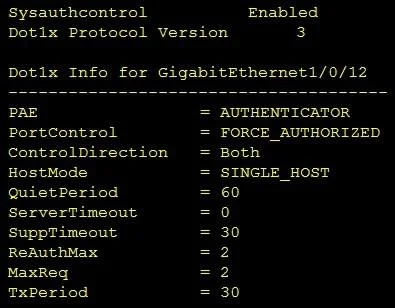
Refer to the exhibit. Which command was used to display this output?
The correct answer is A. show dot1x all. The show dot1x all command provides comprehensive details about the 802.1X configuration and status across all interfaces.
Question
Refer to the exhibit. Which command was used to display this output?
Exhibit
Options
- Ashow dot1x all
- Bshow dot1x
- Cshow dot1x all summary
- Dshow dot1x interface gi1/0/12
How the community answered
(34 responses)- A88% (30)
- B3% (1)
- C6% (2)
- D3% (1)
Why each option
The `show dot1x all` command provides comprehensive details about the 802.1X configuration and status across all interfaces.
The `show dot1x all` command provides comprehensive details about the 802.1X configuration and status across all interfaces on the device, including global parameters, specific interface settings, and authentication session information. This command is typically used to display a detailed breakdown that would include various sections or specific parameters related to the protocol's operation.
The `show dot1x` command typically provides a summarized or less detailed output compared to the `show dot1x all` command.
The `show dot1x all summary` command would provide a summary across all 802.1X-enabled interfaces, which is less detailed than `show dot1x all`.
The `show dot1x interface gi1/0/12` command would specifically display information only for the GigabitEthernet 1/0/12 interface, not a comprehensive view across the device.
Concept tested: Cisco IOS `dot1x` command syntax
Source: https://www.cisco.com/c/en/us/td/docs/ios-xml/ios/sec_conv_8021x/configuration/15-2sy/sec-conv-8021x-15-2sy-cfg.html
Topics
Community Discussion
No community discussion yet for this question.