
350-701 · Question #331
An administrator configures a new destination list in Cisco Umbrella so that the organization can block specific domains for its devices. What should be done to ensure that all subdomains of…
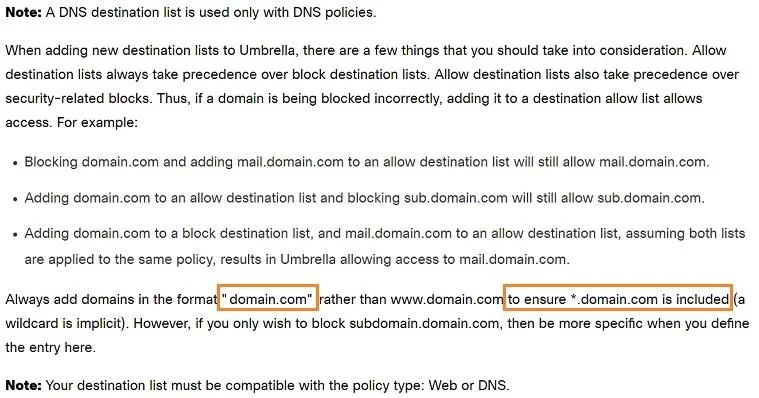
The correct answer is D. Configure the domain.com address in the block list. To block all subdomains of a specific domain in Cisco Umbrella, the administrator should simply add the root domain (e.g., domain.com) to the block list, as Umbrella automatically includes its subdomains.
Question
An administrator configures a new destination list in Cisco Umbrella so that the organization can block specific domains for its devices. What should be done to ensure that all subdomains of domain.com are blocked?
Exhibit
Options
- AConfigure the *.com address in the block list.
- BConfigure the *.domain.com address in the block list.
- CConfigure the *domain.com address in the block list.
- DConfigure the domain.com address in the block list.
How the community answered
(47 responses)- A6% (3)
- B4% (2)
- C15% (7)
- D74% (35)
Why each option
To block all subdomains of a specific domain in Cisco Umbrella, the administrator should simply add the root domain (e.g., `domain.com`) to the block list, as Umbrella automatically includes its subdomains.
Configuring '*.com' would block all domains under the .com top-level domain, which is overly broad and would severely disrupt internet access.
While '*.domain.com' would block subdomains, it is not strictly necessary in Cisco Umbrella as blocking 'domain.com' directly achieves the same outcome for subdomains.
The wildcard format '*domain.com' is generally not a valid or standard way to block all subdomains of 'domain.com' in most DNS-based filtering systems, and is superseded by Umbrella's default behavior.
In Cisco Umbrella, adding the root domain (e.g., domain.com) to a destination block list automatically ensures that all its subdomains are also blocked by default, simplifying policy configuration.
Concept tested: Cisco Umbrella domain blocking behavior
Source: https://docs.umbrella.com/umbrella-user-guide/docs/manage-destination-lists
Topics
Community Discussion
No community discussion yet for this question.