
350-701 · Question #200
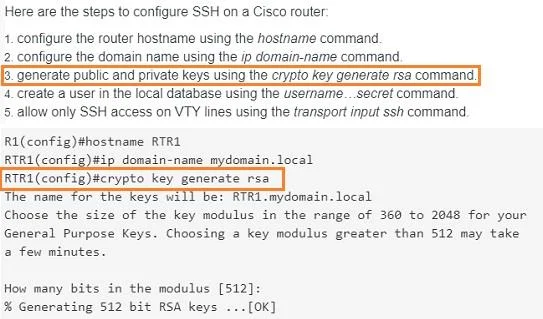
An engineer is trying to securely connect to a router and wants to prevent insecure algorithms from being used. However, the connection is failing. Which action should be taken to accomplish this…
The correct answer is D. Generate the RSA key using the crypto key generate rsa command. To securely connect to a router via SSH and prevent insecure algorithms, an RSA key pair must first be generated on the device.
Question
An engineer is trying to securely connect to a router and wants to prevent insecure algorithms from being used. However, the connection is failing. Which action should be taken to accomplish this goal?
Exhibit
Options
- AConfigure the port using the ip ssh port 22 command.
- BEnable the SSH server using the ip ssh server command.
- CDisable telnet using the no ip telnet command.
- DGenerate the RSA key using the crypto key generate rsa command.
How the community answered
(55 responses)- A5% (3)
- B4% (2)
- C16% (9)
- D75% (41)
Why each option
To securely connect to a router via SSH and prevent insecure algorithms, an RSA key pair must first be generated on the device.
The `ip ssh port 22` command configures the SSH server to listen on a specific port, which is the default, but does not address the lack of cryptographic keys necessary for SSH functionality.
The `ip ssh server` command enables the SSH server process, but it relies on an existing RSA key pair; if keys are not generated, the server will not be fully operational or secure.
The `no ip telnet` command disables the insecure Telnet protocol, which is good practice, but it does not resolve SSH connection failures or enable SSH itself.
For SSH to function securely and allow connections while preventing insecure algorithms, the router must first have an RSA key pair generated using the `crypto key generate rsa` command. This key pair is fundamental for encryption and authentication in the SSH protocol, and without it, SSH connections will fail.
Concept tested: SSH key generation for secure connections
Source: https://www.cisco.com/c/en/us/td/docs/ios-xml/ios/security/s1/sec-s1-cr-book/sec-s1-cr-sec-b2.html
Topics
Community Discussion
No community discussion yet for this question.